The secret to eliminating “tech-neck” isn’t buying an expensive designer chair; it is consistently aligning your screen height with your eye level and taking intentional breaks to reset your spine throughout your busy day. If you are a parent juggling remote work, school runs, and household management, your neck and shoulders are likely carrying the weight of your entire schedule—literally.
- Eye Level is Everything: Your screen should be positioned so that the top third of the monitor is at eye level, preventing the constant downward tilt that causes strain.
- The 20-20-20 Rule: Every 20 minutes, look at something 20 feet away for 20 seconds to reduce eye strain, which is a major contributor to poor posture.
- Movement is Medicine: Static sitting is your enemy; micro-movements and stretching every hour are more effective than one long workout at the end of the day.
Do you ever finish a day of working from your kitchen island or a cramped corner of the living room, only to realize your neck feels like it’s been through a wrestling match? You are not alone. As parents, we often prioritize our kids’ comfort—ergonomic school chairs, properly fitted shoes, and balanced nutrition—while we hunch over laptops on sofas or dining tables, ignoring the growing ache in our cervical spine.
Tech-neck, or “text neck,” is not just a buzzword. It is a repetitive stress injury caused by holding your head in a forward-leaning position for extended periods. When you tilt your head down to look at a screen, you aren’t just moving your head; you are increasing the force on your neck muscles exponentially. For every inch your head moves forward, you add roughly 10 pounds of pressure to your cervical spine. If you spend four hours a day leaning over a laptop, your neck is essentially doing a heavy-duty weightlifting session without any recovery time.
Why Your “Temporary” Setup is Causing Long-Term Damage
Many of us began working from home during the pandemic under the assumption that it would be a temporary arrangement. Years later, that “temporary” setup has become our permanent reality. The problem is that most household furniture is designed for dining or relaxing, not for eight hours of typing, video conferencing, and digital multitasking.
When you sit at a dining table, the chair height is often fixed. If the chair is too low, you hike your shoulders up to reach the keys. If the table is too high, you lean your forearms on the edge, creating pressure points and forcing your neck into a forward jut. This isn’t just about discomfort; it’s about the cumulative wear and tear on your spinal discs and the chronic tightening of your trapezius muscles.
The “parenting factor” adds another layer of complexity. We are constantly switching between professional tasks and domestic demands. You might be responding to a Slack message while simultaneously keeping an eye on a toddler or helping a school-aged child with homework. This rapid task-switching prevents us from settling into a truly ergonomic position, as we are constantly leaning in and out of our workspace.

The Physics of the Forward-Tilt
Think of your head like a bowling ball. When it is balanced directly over your shoulders, your neck muscles barely have to work to keep it upright. As soon as you tilt your head forward to check a notification on your phone or peer at a laptop screen, that bowling ball becomes a significantly heavier load for your neck muscles. This forces the muscles in your upper back and neck to work overtime to stabilize your head.
Over time, these muscles become chronically tight, leading to tension headaches, shoulder stiffness, and even tingling in your fingers caused by compressed nerves. This is why you might feel “knots” in your shoulders that seem to reappear no matter how many massages you get. The root cause isn’t just muscle tension; it is a structural imbalance caused by your environment.
Building a “Parent-Proof” Ergonomic Workspace
You don’t need a five-thousand-dollar home office suite to fix your posture. In fact, most high-end office furniture is designed for a “standard” body type that doesn’t account for the reality of working in a shared home space. Instead, focus on these fundamental adjustments that can be made with items you already have at home.
| Component | The Goal | The “At-Home” Fix |
|---|---|---|
| Screen Height | Top 1/3 at eye level | Use a stack of sturdy books or a dedicated laptop stand. |
| Keyboard/Mouse | Elbows at 90 degrees | Use an external keyboard and mouse so your laptop can stay elevated. |
| Feet | Flat on the floor | Use a footrest or a sturdy box if your chair is too high. |
| Lower Back | Supported arch | Place a small cushion or rolled-up towel behind your lower spine. |
The Laptop Stand Revolution
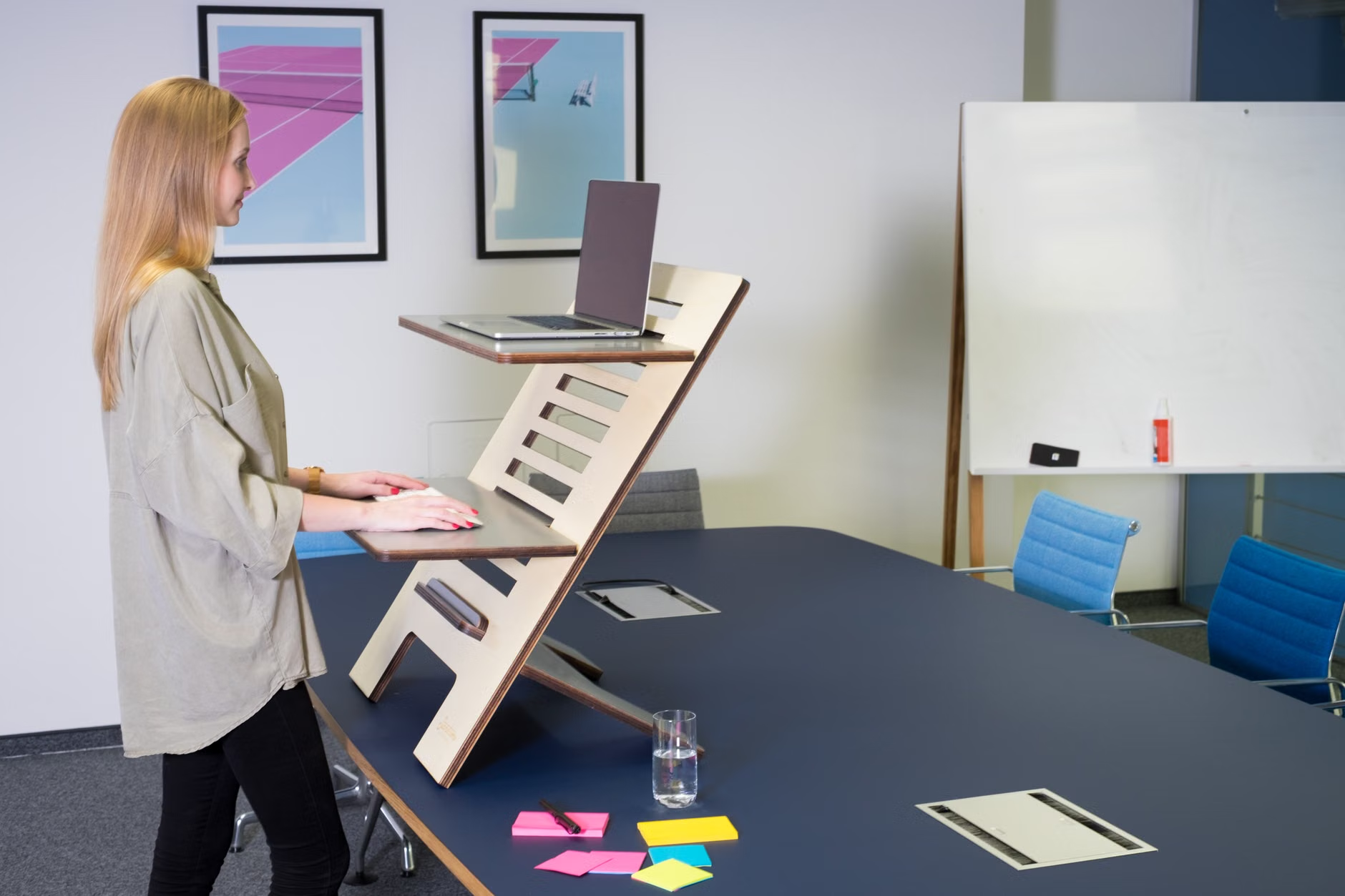
If you take away only one piece of advice from this article, let it be this: stop looking down at your laptop screen. Using a laptop on a desk is a guaranteed recipe for neck pain. The screen is too low, and the keyboard is attached to it, making it physically impossible to have both at an ergonomic height simultaneously.
Invest in an external keyboard and a mouse. This allows you to place your laptop on a stand—or even a stack of thick hardcover books—so the screen is at your eye level. Your hands stay at desk height, and your neck remains in a neutral, relaxed position. This simple change alone can resolve the majority of tech-neck symptoms within a few weeks.
Chair Comfort and Lumbar Support
If you are working from a wooden kitchen chair, you are missing out on the lumbar support your spine needs. You don’t necessarily need a fancy mesh ergonomic chair. You can create support by rolling up a towel and placing it horizontally across the small of your back. This encourages your spine to maintain its natural “S” curve rather than slouching into a “C” shape, which puts immense pressure on your lower and mid-back.
Check your seat depth as well. You should be able to sit all the way back in your chair with your knees slightly in front of the seat edge. If the chair is too deep, your legs will dangle or you will naturally slide forward, losing all back support. A small cushion behind your back can help bridge this gap.
The Hidden Power of Micro-Breaks and Movement
Even with the perfect desk setup, your body is not designed to remain static for eight hours. In fact, “static loading”—the act of holding a single posture for a long time—is just as damaging as poor posture. Our bodies crave movement to circulate blood and keep our joints lubricated.
As parents, we often have the advantage of being interrupted. Use these interruptions to your benefit. Don’t view a child asking for a snack or the dog needing to go outside as a nuisance; view it as a mandatory “ergonomic reset.”
The “Reset” Checklist for Every Hour
When you have a moment, perform these quick movements to counteract the “tech-neck” posture:
- The Chin Tuck: Sit up straight and pull your chin straight back as if you are making a “double chin.” Hold for three seconds and release. This strengthens the deep neck flexors that have become weak from slouching.
- The Scapular Squeeze: Imagine you are trying to hold a pencil between your shoulder blades. Squeeze your shoulder blades together and down. This opens up your chest and counteracts the “rounded shoulders” posture we get from typing.
- The Overhead Reach: Interlock your fingers and reach toward the ceiling. This decompresses the spine and provides a much-needed stretch for the intercostal muscles in your ribcage.

Addressing the Digital Parenting Juggle
It’s not just your desk work that contributes to tech-neck. It’s the “in-between” times. We often spend our downtime scrolling through our phones while waiting for kids at extracurricular activities or during those precious few minutes of downtime at the end of the day. This “phone-neck” is often worse than office-desk-neck because we are rarely mindful of our posture when we are in “relax mode.”
Mindful Scrolling
Try to bring your phone up to your eye level rather than dropping your chin to your chest. It feels a bit awkward at first, but your neck muscles will thank you. If you are reading a long article or watching a video, prop your phone against a water bottle or a stand. If you find yourself mindlessly scrolling, set a timer for 10 minutes. When the timer goes off, force yourself to put the phone down and look at the horizon.
Creating Boundaries for Your Physical Health
Parenting is a physically demanding job. Carrying children, lifting groceries, and cleaning up messes all involve repetitive motions. If you spend your work hours straining your neck, you are less likely to have the energy or the physical capability to handle these tasks without strain. Think of your ergonomic setup as an investment in your ability to be a present, active parent.
If you are working in a shared space, try to establish a “work zone” that is strictly for professional tasks. When you leave that zone, leave the posture-related habits behind. Don’t bring the “desk hunch” to the dining table during family meals. Consciously shaking out your shoulders when you transition from “work mode” to “parent mode” can act as a mental and physical trigger to release the tension you have been holding.
When Should You Seek Professional Help?
While most cases of tech-neck can be managed with better habits and a more thoughtful workspace, there are times when pain signals indicate something more serious. If you experience persistent numbness or tingling in your hands, sharp shooting pains down your arm, or headaches that become increasingly frequent and severe, it is time to consult a medical professional, such as a physical therapist or a doctor.
Physical therapists are particularly helpful for parents because they can provide personalized exercises that address your specific muscle imbalances. They can look at how you move throughout your day—lifting a child, carrying a heavy bag, sitting at your desk—and offer functional solutions that generic internet advice might miss. Don’t wait until the pain becomes chronic. Early intervention is key to preventing long-term spinal issues.
A Realistic Approach to Long-Term Wellness
Improving your posture is not a one-time project; it is a lifestyle adjustment. You will have days where you fall back into bad habits, especially during busy weeks when deadlines are tight and the kids are demanding more of your attention. That is okay. The goal isn’t perfection; the goal is awareness.
Start small. Fix your screen height today. Tomorrow, focus on your chair support. Next week, try to implement the 20-20-20 rule. By making these incremental changes, you are building a foundation of wellness that will serve you and your family for years to come. Your neck will feel lighter, your headaches will decrease, and you will find yourself with more energy for the parts of life that truly matter.
Remember, the best posture is the “next” posture. No matter how ergonomic your chair is, the human body is meant to move. Don’t let your workspace trap you in a static, painful position. Take ownership of your environment, prioritize your physical comfort, and give yourself the grace to adjust as you go. You are doing a lot, and you deserve to feel good while doing it.
Frequently Asked Questions
Q: How long does it take for tech-neck symptoms to go away once I start using an ergonomic setup?
A: Most people notice a significant reduction in tension and stiffness within two to four weeks of consistently using an ergonomic setup and performing regular stretches. However, if your pain is chronic, it may take longer for the muscles to retrain. Consistency is far more important than intensity; doing small stretches daily is better than one intense session a week.
Q: Can I use a standing desk to solve tech-neck?
A: A standing desk can be a great tool, but it is not a “magic bullet.” Standing for too long can cause lower back and leg issues. The key is to alternate between sitting and standing throughout the day. When standing, ensure your screen is still at eye level; many people make the mistake of looking down at their laptop even when standing, which simply moves the tech-neck problem to a different position.
Q: Are there specific exercises that are dangerous for someone with existing neck pain?
A: Avoid aggressive neck rolls or “cracking” your neck, as these can put unnecessary strain on the joints and ligaments if done incorrectly. Focus on gentle, controlled movements like chin tucks and shoulder blade squeezes. If any exercise causes sharp, shooting pain, stop immediately and consult a healthcare professional. It is always best to start with gentle range-of-motion exercises rather than high-resistance movements.
For more information on workplace ergonomics and preventing repetitive strain injuries, you can refer to the resources provided by the Occupational Safety and Health Administration (OSHA) and the Mayo Clinic’s guide on office ergonomics.