The most effective way to end sibling conflict over digital resources is to shift the power dynamic from “parent-as-referee” to “system-as-authority.” When you stop being the person who says “no” and start relying on objective, pre-agreed rules and automated tools, the friction between siblings drops significantly because there is no one left to lobby or manipulate.
- Automate the Rules: Use built-in parental control software to enforce time limits, removing yourself from the role of the “bad guy.”
- Defined Ownership: Clearly distinguish between “personal” devices and “shared” devices to reduce territorial disputes.
- Transition Rituals: Use physical timers or visual cues to signal the end of a session, which reduces the emotional shock of being told to stop.
If your house sounds like a courtroom every time a tablet needs to be charged or a turn on the gaming console ends, you are far from alone. For parents in their 30s and 40s, the digital landscape has become the primary battleground of the modern home. It is a unique kind of exhaustion: you aren’t just managing chores or homework; you are managing a high-stakes, high-emotion resource that feels like it’s being rationed in a post-apocalyptic movie.
The Psychology of the Digital Tug-of-War
Why do screens trigger such visceral fights? It isn’t just about the content. Digital devices provide instant gratification, dopamine hits, and a sense of autonomy that, frankly, children don’t get in many other parts of their lives. When a sibling asks for the iPad, they aren’t just asking for a piece of plastic and glass; they are asking for the interruption of a flow state. To a child, being told to hand over the device feels like a physical loss of control.
Understanding this “flow state” is crucial. When your child is deep into a game or a video, their brain is fully engaged. Abruptly ending that engagement—especially to hand it over to a sibling—is a massive cognitive shift. It’s no wonder they scream. The conflict isn’t necessarily about greed; it’s about the frustration of having their focus shattered.
Furthermore, siblings often view screens as a zero-sum game. If one child has the iPad for an hour, the other feels they have “lost” an hour of potential entertainment. This is where the “fairness” argument comes in. Children are hyper-aware of time and equity. If you don’t have a visible, objective system, they will spend their entire afternoon keeping score, which inevitably leads to the shouting matches you are trying to avoid.
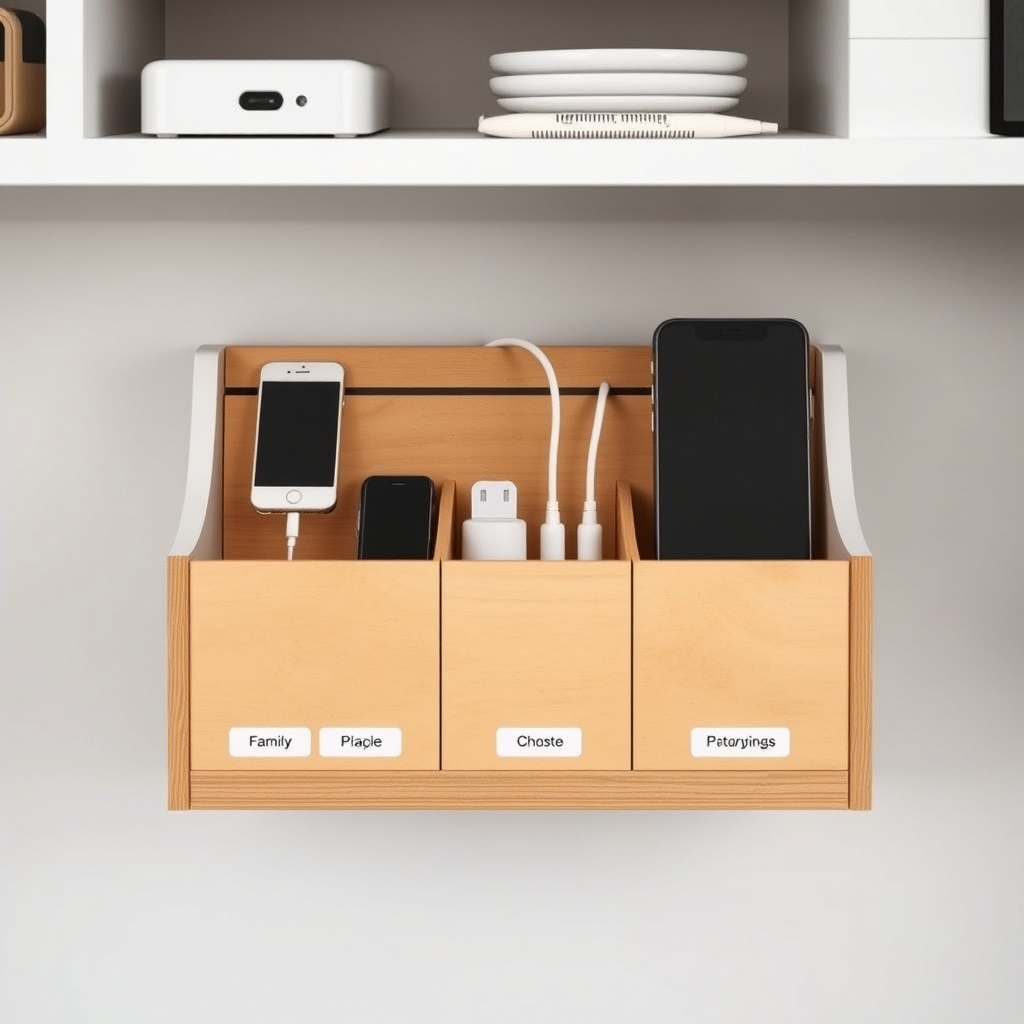
Step 1: Establishing the Infrastructure of Fairness
Before you try to mediate a fight, you need to audit your physical environment. If the chargers are scattered, if the controllers are hidden in different rooms, or if the devices are just “floating” around the house, you have created a system that invites chaos. You need a dedicated “Digital Landing Zone.”
A Digital Landing Zone is a specific, non-negotiable spot in your home where devices live when they aren’t being used. This serves two purposes. First, it makes it impossible for one child to “hoard” a device under their pillow. Second, it creates a clear boundary: if it’s in the zone, it’s available; if it’s in your hand, it’s earned. This physical organization removes the “treasure hunt” aspect of screen time, which is often a hidden catalyst for frustration.
Consider implementing a “Check-in/Check-out” system, even if it’s informal. If you have two kids and one shared console, use a whiteboard or a simple digital calendar to map out blocks of time. When the time is up, the device goes back to the Landing Zone. This isn’t about being a drill sergeant; it’s about providing a predictable structure. When kids know exactly when their turn is coming, they are significantly less likely to badger their sibling for a turn right now.
Step 2: Leveraging Technology to Be the “Bad Guy”
One of the biggest mistakes parents make is manually enforcing time limits. Every time you walk over and say, “Okay, your time is up, give it to your brother,” you are inserting yourself into the conflict. You are now the obstacle. The child who is losing the device sees you as the antagonist, and the child who is gaining the device sees you as the savior. This dynamic is a recipe for resentment.
Instead, let the software be the bad guy. Modern parental control tools—such as Apple’s Screen Time, Google Family Link, or the parental controls built into consoles like the Nintendo Switch—allow you to set hard limits. When the time is up, the screen locks. You don’t have to be the one to snatch the device away; the device simply stops working. It is an objective, impersonal boundary.
When the screen locks automatically, the negotiation is over. There is no point in arguing with the device. This shift is subtle but profound. It moves the conflict from “Mom/Dad is mean” to “The system has reached its limit.” It forces the children to accept the reality of the situation rather than trying to negotiate for an extra five minutes.
| Strategy | Old Way (Parent as Referee) | New Way (System as Authority) |
|---|---|---|
| Time Enforcement | “It’s 4:00, put it away now.” | Device locks automatically at 4:00. |
| Conflict Resolution | Parent mediates the “he said/she said.” | Refer to the pre-agreed household schedule. |
| Transition | Sudden, jarring stops. | “Warning” notifications 5 minutes prior. |
Step 3: The Art of the Transition
The most volatile moment in any digital session is the transition. Moving from the high-stimulation world of a game to the low-stimulation world of reality is difficult for a child’s nervous system. If you want to avoid the “meltdown at the handoff,” you must build in buffer time.
Use visual or auditory cues that aren’t you. Set a physical kitchen timer that sits on the table. When the timer goes off, the transition begins. Even better, set the device itself to provide a five-minute warning. This gives the child a chance to finish their level or save their progress. If they are in the middle of an online game that cannot be paused, the rule should be: “You can finish the match, but that is the *only* match you get.”

If you find that the handoff is still causing fights, introduce a “Cool Down” period. During this time, no one gets the device. It goes back to the Landing Zone for 15 minutes. This removes the incentive to fight over who gets it next, because the winner of the fight doesn’t get the prize immediately. It resets the atmosphere in the room and allows the frustration to dissipate.
Step 4: Creating a Family Media Agreement
Sit down with your children during a calm moment—not while they are fighting over a game—and draft a “Family Media Agreement.” This is essentially a contract that everyone signs, including you. It doesn’t have to be a legal document; it can be a simple list of values and rules.
Include items like:
- We always ask before taking a shared device.
- We respect the “save” points of others (no deleting someone else’s progress).
- We use the Landing Zone when we are done.
- If we argue about the device, we lose the device for the rest of the day.
The power of this agreement lies in the fact that it was created when everyone was rational. When a fight happens, you don’t need to come up with a punishment on the spot. You simply point to the agreement. “Remember what we agreed to? If we fight, the console goes away.” It makes your enforcement feel like a logical consequence of their actions, rather than an arbitrary punishment.

Managing Different Age Gaps
The conflict dynamics change significantly depending on the age gap between siblings. If you have an older child and a toddler, the older child often feels that the younger one is “destroying” their experience. If you have children close in age, it’s a pure territorial battle.
For the older child, provide a sense of agency. Let them have a “private” folder or a password-protected profile on the shared device. This ensures that their progress, their digital art, or their messages remain untouched. When the younger sibling knows they literally cannot access the older sibling’s “world,” they are less likely to try to interfere.
For the younger sibling, focus on providing a “near-peer” alternative. Sometimes they want the iPad simply because they want to be doing what the older one is doing. If you offer a high-quality, non-digital alternative that mimics the engagement of the screen—like a complex building set or a creative craft—you can sometimes divert the interest before the fight even begins.
When to Step In (and When to Walk Away)
As a parent, your hardest job is determining when your intervention is actually helpful. If you jump into every squabble, you are teaching your children that they don’t need to learn conflict resolution skills because you will always fix it for them. This is a missed opportunity for development.
Try the “Wait and Watch” method. When the voices start rising, don’t run in. Stand in the doorway or listen from the next room. Are they resolving it? Are they negotiating? Are they compromising? If they are, let them be. The moment they start using physical force or verbal abuse, that is your cue to step in. But if they are just arguing about whose turn it is, give them a minute. You might be surprised to find that they settle it themselves once they realize you aren’t coming to bail them out.
If you do have to step in, stay calm. Your goal is to de-escalate, not to win the argument. Use “I” statements. “I see that you both want to use the tablet, and I see that this is frustrating. Since we can’t agree on a turn, the tablet is going into the Landing Zone for an hour.” Do not apologize for this. Do not explain it at length. Just execute the rule.
Common Pitfalls and How to Avoid Them
One common mistake is using screen time as a reward or punishment for unrelated behavior. If you use screen time as a currency for chores or good grades, you are artificially inflating the value of the device. It becomes something that is “earned” and therefore something worth fighting tooth and nail to keep. Instead, treat screen time as a neutral activity, like reading or playing outside. It has its place in the day, and it is governed by the same rules regardless of how well the child cleaned their room.
Another pitfall is the “one more minute” trap. When you give in and allow an extra five minutes, you have just taught your child that your “no” actually means “maybe.” This creates a recurring negotiation pattern. If you say the time is up, the time is up. If you feel the need to be flexible, build that flexibility into the system from the start (e.g., “You have 60 minutes, and you can manage that however you like”).
Finally, avoid the “technological band-aid.” Do not give a child a device just to keep them quiet so you can get work done. When you do this, you are using the device as a babysitter, and the children know it. They recognize that the device is a tool for your convenience, and they will use that leverage to push boundaries. If you need them to be quiet, use a different strategy—audiobooks, activity books, or independent play—that doesn’t involve the high-stakes friction of a screen.
The Long-Term Goal: Digital Literacy
Remember that the goal isn’t just to stop the fighting; the goal is to raise children who can manage their own digital consumption. By implementing these systems, you are teaching them about time management, respect for property, and the importance of boundaries. These are skills that will serve them far better than the ability to play a game for three hours straight.
When they are teenagers, they will have their own devices. If you have spent their childhood modeling these healthy boundaries, they will be much more likely to apply them to their own lives. They will understand that devices have a place, that they can be used responsibly, and that they shouldn’t dictate the quality of their relationships with others.
Be patient with yourself. This is a process. There will be days when the system breaks down, when the kids are tired, and when everyone ends up crying. That is okay. It doesn’t mean your system failed; it means you are all human. Reset the next day, stick to the plan, and keep the focus on the big picture: a home where screens are a tool for enjoyment, not a source of misery.
Frequently Asked Questions
Q: What should I do if one child is clearly faster at finishing their “turn” than the other?
A: Focus on time, not progress. If the agreement is 30 minutes, it’s 30 minutes. If one child finishes their game in 10 minutes and wants to do something else, that’s their choice. They shouldn’t be penalized or rewarded for how quickly they play. Stick to the clock, not the activity.
Q: How do I handle it when a child claims they “didn’t get enough time”?
A: Use an objective timer. If they claim they were interrupted or didn’t get their full slot, look at the logs in your parental control software. Most modern systems show exactly how much time was used. If the data shows they had their time, the conversation is over. If there was a system glitch, offer a small “make-up” time for the next day.
Q: Is it ever okay to let them fight it out?
A: Yes, provided it doesn’t cross the line into physical aggression or verbal harassment. Learning to negotiate for time or space is a vital social skill. If you intervene too early, you prevent them from practicing the very compromise you want them to learn. Use your judgment, but err on the side of giving them space to solve it themselves.
For more information on setting up parental controls and creating a digital balance in your home, you can visit resources like Common Sense Media or the official support pages for Apple and Google Family Link.
Managing the digital divide in your home is a marathon, not a sprint. By moving from a reactive, emotional referee to a proactive, system-oriented guide, you can reclaim your peace and help your children develop a healthier relationship with the technology that surrounds them.