If you want a truly private smart home that doesn’t share your family’s daily habits with third-party corporations, the only viable solution is to move your automation logic from the cloud to a local, open-source hub.
Key Takeaways
- Local Processing is Non-Negotiable: Open-source hubs like Home Assistant process data within your four walls, ensuring that your light schedules, sensor data, and camera feeds never leave your local network.
- Interoperability Over Ecosystem Lock-in: Unlike proprietary hubs that force you to buy one brand, open-source platforms bridge hundreds of different manufacturers, allowing you to choose the best hardware for your budget.
- Future-Proofing Your Home: By decoupling your home’s “brain” from a company’s cloud service, your smart home won’t stop working if a startup goes bankrupt or decides to end support for your device.
The Hidden Cost of “Free” Cloud-Based Smart Homes
We’ve all been there. You buy a smart bulb or a video doorbell because it promises to make life easier. You set it up, download the app, and suddenly, you’re part of a massive, invisible data-gathering machine. Most mainstream smart home devices rely on “the cloud”—a network of remote servers owned by tech giants. When you turn on your lights, that command often travels from your home, to a server halfway across the world, and back again. This isn’t just a latency issue; it’s a profound privacy vulnerability.
For families in their 30s and 40s, this matters because your home is the most intimate space you have. Do you really want a corporation tracking when you wake up, when you leave for work, or when your children are home alone? Many cloud-based systems log this metadata to create “behavioral profiles.” These profiles aren’t just for improving your user experience; they are often used to refine advertising algorithms or sold to third-party data brokers. When you use a proprietary hub, you are essentially trading your family’s privacy for the convenience of remote control.
Furthermore, there is the issue of “planned obsolescence” and service shutdowns. We have seen countless instances where a company shuts down its cloud servers, turning perfectly functional hardware into expensive paperweights. By adopting an open-source hub, you take back ownership. You are no longer a tenant in your own home’s ecosystem; you become the administrator.
What Exactly Is an “Open-Source” Home Hub?
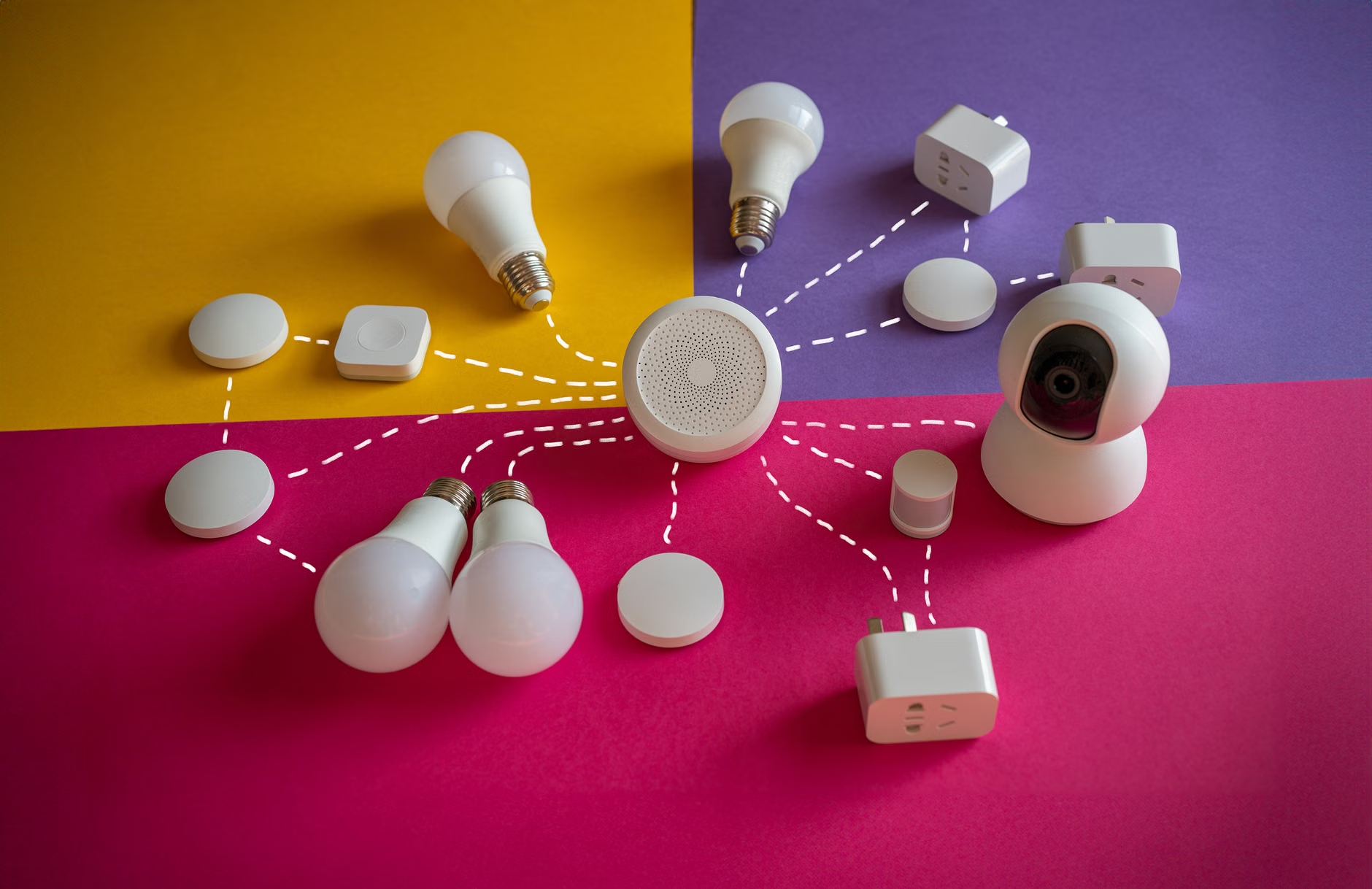
An open-source home automation hub is software—usually running on a small, low-power computer like a Raspberry Pi or a dedicated mini-PC—that acts as the central brain for all your smart devices. Unlike a product from a big-box store, the code behind these hubs is transparent, community-vetted, and designed for local operation.
The most prominent example, and the one I recommend for most families, is Home Assistant. It acts as a universal translator. It speaks the language of thousands of different devices, from Philips Hue lights to Shelly relays and Zigbee sensors. Because it runs locally, even if your internet connection goes down, your home’s automation keeps running. The “cloud” is completely optional, and you decide what, if anything, ever reaches the outside world.
Think of it as the difference between renting an apartment where the landlord can change the locks or enter whenever they want, versus owning your own house. You have the keys, you decide who enters, and you set the rules for how everything functions.

Breaking Free from Ecosystem Silos: The Interoperability Advantage
One of the most frustrating aspects of modern smart homes is the “walled garden” approach. You buy a smart lock that only works with one specific brand’s hub, or a set of cameras that refuses to talk to your thermostat. This fragmentation forces families to either stick to one brand—limiting their choices—or juggle half a dozen apps on their phones, which defeats the entire purpose of “smart” living.
Open-source hubs shatter these walls. Because they are built on open standards, they can integrate devices that were never intended to work together. This is a game-changer for budget-conscious families. You don’t have to buy the most expensive, brand-name gear. You can mix and match.
| Feature | Proprietary Cloud Hub | Open-Source Local Hub |
|---|---|---|
| Data Storage | Cloud Servers (Global) | Local Hardware (Your House) |
| Internet Dependency | Required for most functions | Zero dependency |
| Device Compatibility | Limited to “Works with…” brands | Universal (Zigbee, Z-Wave, WiFi, Bluetooth) |
| Privacy Level | Low (Data mining risk) | High (Total control) |
For instance, you might find a high-quality Zigbee temperature sensor for a fraction of the price of a big-brand alternative. With a proprietary hub, you’re out of luck. With an open-source hub, you simply pair it, create a simple automation—like “if temp > 25°C, turn on the fan”—and you’re done. This level of flexibility allows you to build a robust system that grows with your family’s needs without being held hostage by a single manufacturer’s pricing or product roadmap.
Setting Up Your First Local Hub: A Practical Guide
Starting with a local hub might sound intimidating, but the community has made it surprisingly accessible. You don’t need to be a software engineer. If you can follow a set of instructions for building flat-pack furniture, you can set up a basic home automation server.
Step 1: Choose Your Hardware
You need a device to run the software. A Raspberry Pi 4 or 5 is the classic choice, but many people find that a used “thin client” or a small Intel NUC (mini-PC) offers better performance and reliability. These machines are often available on the secondary market for a very reasonable price.
Step 2: Install the Operating System
Most modern open-source hubs provide a dedicated OS image. You flash this onto a memory card or SSD, plug it into your computer, and connect it to your router via Ethernet. This ensures a stable connection.
Step 3: Discover and Integrate
Once the hub is powered on, it will scan your local network. It will likely find your smart TV, your lights, and your media players automatically. You just need to click “configure” and enter your credentials. It’s a process of discovery, not complex coding.
Common Mistakes to Avoid
The most common mistake is trying to do too much, too fast. Don’t try to automate your entire life in one weekend. Start with one room. Maybe automate your living room lights based on motion. Once you see how it works, expand to your hallway, then your entryway. By building incrementally, you avoid the frustration of troubleshooting a massive, complex system that you don’t fully understand yet.
Let’s be clear: “Privacy” in a smart home doesn’t mean you have to disconnect from the world. It means you are the gatekeeper. When you move to a local system, you gain control over what data is transmitted. However, this brings the responsibility of security to your doorstep. Since your hub is no longer behind a major corporation’s firewall, you must ensure your local network is secure.
This means using strong, unique passwords for your home network, keeping your hub’s software updated (which is usually a one-click process), and being careful about what you expose to the internet. If you want to control your home while you’re on vacation, you shouldn’t just “open a port” on your router. Instead, use a secure VPN or an encrypted remote-access service like Tailscale or Nabu Casa, which provide secure tunnels into your home without exposing your devices to the open web.
This is the “adult” version of smart home management. It’s not about flashy ads; it’s about infrastructure. You are treating your home’s digital presence with the same care as your physical home’s locks and windows. It’s an investment of time, but the peace of mind knowing that your data is not being used to build a profile on your children is, in my view, priceless.
The Human Element: How Automation Affects Family Life
When we talk about automation, we often focus on the tech. But the real value is in how it changes your daily routine. With an open-source hub, you can create “scenes” that actually make sense for your family. For example, a “Movie Night” scene could dim the lights to 20%, turn off the kitchen lights, and ensure the blinds are closed—all with one voice command or a single button press.
But the real magic happens in the background. A “Goodnight” automation can check that all doors are locked, the thermostat is set to your preferred sleeping temperature, and the porch light is turned off, all without you having to check an app. It reduces the “mental load” that parents often carry. Instead of worrying about whether you left the garage open, you know the system will handle it.
Crucially, because you aren’t relying on a cloud service, these automations work even if the internet is down. If your ISP has an outage during a storm, your home shouldn’t stop functioning. In a local system, the “brain” of your house is sitting in your utility closet, not in a data center in a different time zone. This reliability is the hallmark of a mature, well-designed smart home.
Beyond the Basics: Advanced Insights for Long-Term Success
If you decide to dive into the open-source world, there are a few things that aren’t mentioned on the front page of the official docs. First, backups are your best friend. Because you control the system, you also control the recovery. Set up an automated backup to a secondary location—a simple USB drive or a network-attached storage (NAS) device. If your hub’s storage fails, you can restore your entire home configuration in minutes.
Second, consider the “Wife/Husband/Kids Acceptance Factor.” If your automation is too complex, your family will hate it. If the lights turn off while someone is reading because the motion sensor didn’t detect them, the system becomes a source of annoyance rather than help. Always design your automations with an “override” in mind. Physical switches should always work, and manual control should always be prioritized over automated logic.
Finally, look for “local-only” hardware whenever possible. Devices that use Zigbee or Z-Wave protocols are inherently local. They don’t need your home WiFi to talk to your hub. This keeps your WiFi bandwidth clear for your streaming and working-from-home needs, and it prevents your devices from “phoning home” to manufacturer servers.
Taking the First Step
Moving to an open-source hub isn’t a weekend project that ends in a perfect, finished state. It’s an evolving process of tailoring your home to fit your family’s specific rhythms. Start by researching Home Assistant and looking at their community forums. You will find thousands of other families who have already solved the exact problems you are facing.
The transition from a cloud-dependent home to a private, local one is one of the most empowering technology decisions you can make. It’s about taking back the digital sovereignty of your home. You aren’t just saving money on subscriptions or avoiding planned obsolescence; you are building a home that is truly yours—private, reliable, and designed to serve you, not the other way around.
If you are feeling overwhelmed, remember: start with one light. Once you see that light turn on through your own local server, you’ll understand why this is the only way to build a sustainable smart home for the long haul.
Frequently Asked Questions
Q: Do I need to be a programmer to use an open-source hub like Home Assistant?
A: Not at all. While coding skills can help with advanced customizations, the modern interface is largely graphical. Most integrations are handled through simple forms and menus. The community provides extensive documentation and templates that you can copy and paste to get started.
Q: What happens if I want to use voice assistants like Alexa or Google Home?
A: You can still use them! You can bridge your local hub to these services. The key difference is that your local hub acts as the primary controller. If the internet goes down, your local automations keep working, and you maintain control over which data is sent to the voice assistant providers.
Q: Is this actually cheaper than just buying smart home kits?
A: In the long run, yes. While you may spend a bit more on a reliable dedicated hub or a mini-PC, you save money by being able to buy cheaper, generic sensors and devices that don’t require expensive, brand-name hubs. Plus, you avoid the hidden costs of subscription services that many manufacturers are now forcing upon users.
For further reading and to begin your journey, visit the official Home Assistant website at https://www.home-assistant.io/ to see the latest supported devices and installation guides.