You can reclaim hours of lost time and significantly lower your daily stress by dedicating just 15 minutes a day to a systematic “digital declutter.”
- The 15-Minute Rule: Consistency beats intensity; small, daily actions prevent the “digital pile-up” that leads to overwhelm.
- Triage Over Cleanup: Focus on removing high-friction digital elements like unnecessary push notifications and unused apps first.
- Systematic Maintenance: Treat your digital space like your physical home—it requires regular, scheduled upkeep to remain functional.
Do you ever feel that specific, sinking sensation when you open your phone and see 47 unread email notifications, a gallery full of blurry screenshots you forgot to delete, and a home screen cluttered with apps you haven’t touched since 2022? For those of us balancing work, family schedules, and the general chaos of life in our 30s and 40s, this digital “clutter” isn’t just an eyesore—it’s a major contributor to cognitive load.
We often talk about decluttering our closets or kitchen pantries, but our digital lives are where we spend most of our waking hours. If your digital environment is messy, your focus will be fragmented. Let’s look at how to fix this without spending your entire weekend hunched over a screen.
Why Your Digital Environment Is Draining Your Battery
Psychologically, digital clutter acts as a constant, low-level background stressor. Every time you unlock your phone, your brain subconsciously registers the unread messages, the outdated calendar alerts, and the overwhelming number of apps. This is known as “choice paralysis” or “decision fatigue.” When you have too many inputs, your brain struggles to prioritize the tasks that actually matter to your family or your career.
Consider the “Zeigarnik Effect,” a psychological phenomenon where our brains remember uncompleted tasks better than completed ones. Those unread emails and half-finished digital projects are essentially “open tabs” in your brain. They are constantly consuming mental RAM, even when you aren’t looking at them. By clearing out the digital noise, you aren’t just cleaning up a screen; you are clearing out mental space for the things that actually bring you joy—like playing with your kids or finishing that book you started three months ago.
The 15-Minute Daily Sprint Plan
The secret to a successful digital declutter isn’t a “deep clean” weekend that leaves you exhausted. It’s a micro-habit strategy. Think of it like washing the dishes: if you do them every day, they never pile up into a mountain that takes hours to scrub. We have designed a 15-minute daily rotation that covers the most common sources of digital friction.
| Day | Focus Area | Specific Action |
|---|---|---|
| Monday | Inbox Triage | Unsubscribe from 5 newsletters; archive old threads. |
| Tuesday | App Purge | Delete 2 apps you haven’t opened in a month. |
| Wednesday | Photo Cleanup | Delete blurry photos, screenshots, and duplicates. |
| Thursday | Notification Audit | Disable non-essential push notifications. |
| Friday | Desktop/Downloads | Clear the “Downloads” folder and desktop files. |
| Saturday | Security/Passwords | Check for leaked passwords or update one login. |
| Sunday | Rest/Review | No digital tasks; enjoy screen-free time. |
Monday: Taming the Email Beast
Most of us treat our email inbox as a to-do list, which is a recipe for disaster. On Mondays, spend your 15 minutes specifically on “unsubscribing.” Use services like Unroll.me or simply search the word “unsubscribe” in your search bar to find the newsletters that have been clogging your feed. If you haven’t read a newsletter in three consecutive weeks, hit that link. Your future self will thank you when your inbox only contains actionable items.
Tuesday: The App Purge
Apps are designed to keep us engaged, often to our detriment. Go to your phone’s storage settings to see which apps you haven’t used in 30 days. Be honest: if you haven’t used the “step counter” or the “recipe discovery” app in a month, delete it. You can always download it again if you truly need it. Removing these apps reduces “app-hopping” and helps you focus on the tools that actually serve your life.
Wednesday: The Photo Gallery Refresh
Screenshots are the silent clutter-builders of the modern parent. We take them to remember a code, a recipe, or a funny meme, and then we never look at them again. Spend your Wednesday 15 minutes deleting screenshots and blurry “burst” photos. Use built-in features like “Clean Up” on iOS or “Files by Google” on Android to help identify large files and duplicates automatically. This isn’t just about storage space; it’s about making your memories easier to find.
Thursday: The Notification Audit
Notifications are the single biggest interruption to deep work and family connection. Go into your settings and turn off *everything* except for direct communication (phone calls, texts from family, calendar alerts). Does your game app really need to alert you that your “energy is full”? Does your news app need to send you a push notification for every minor update? If it’s not urgent, it shouldn’t be interrupting your dinner.
Friday: Desktop and Downloads Cleanup
We often use our computer desktop as a “temporary” storage space that becomes permanent. On Fridays, spend 15 minutes moving files into proper folders or trashing them. Empty your “Downloads” folder entirely. Most files in there are temporary installers or documents you no longer need. This small act makes starting your work on Monday morning feel significantly less overwhelming.
The “Digital Minimalism” Mindset for Parents
As parents in our 30s and 40s, we are the bridge generation. We remember a time before smartphones, yet we are raising kids in a world where technology is omnipresent. This puts us in a unique position to model healthy digital habits. If your children see you constantly checking your phone, they will internalize that technology is the primary focus of your attention. By practicing a 15-minute digital declutter, you are demonstrating that technology is a tool, not a master.
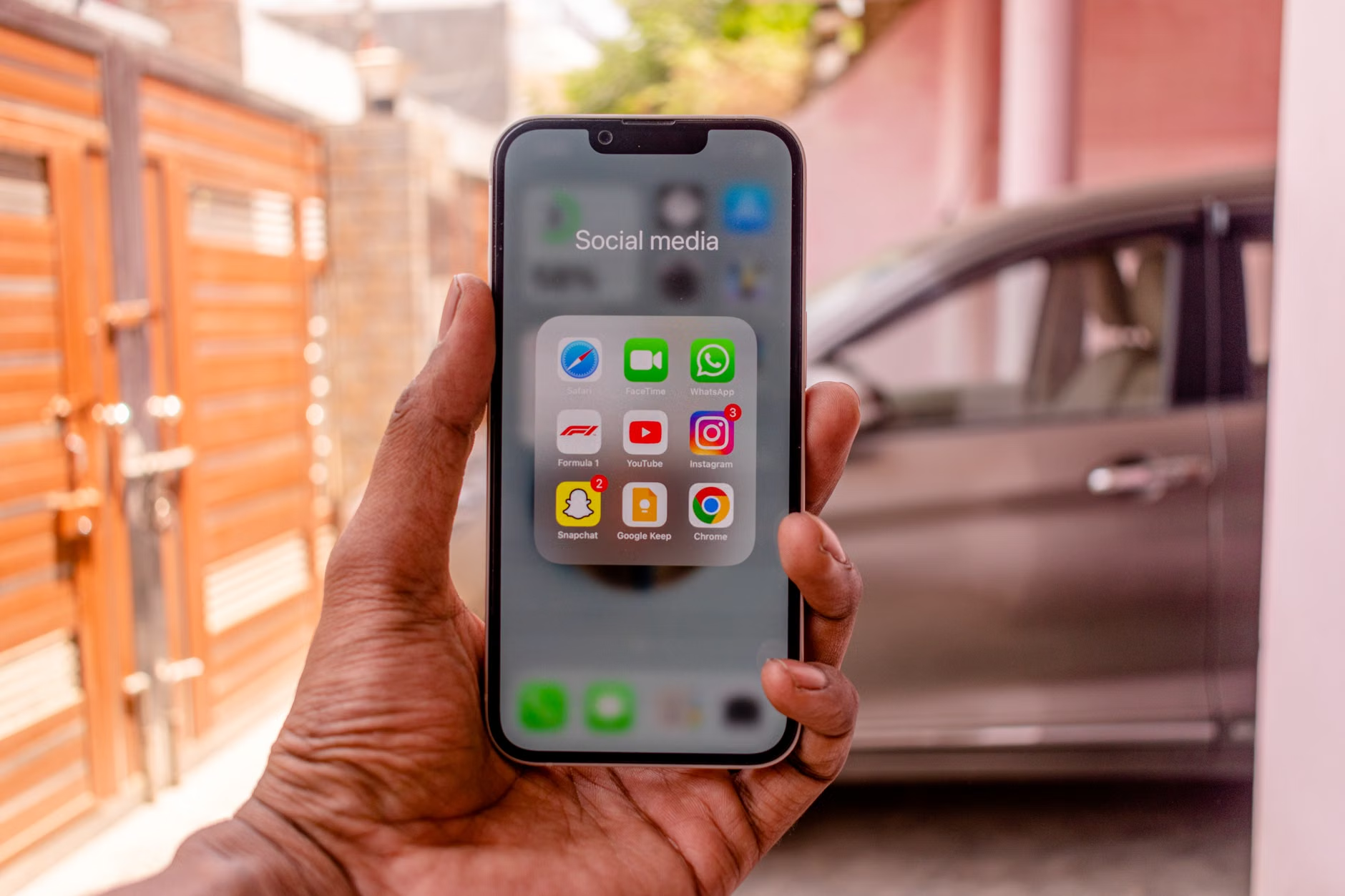
Consider the concept of “Digital Friction.” Designers work hard to remove friction from apps to keep you using them. You should work hard to *add* friction back in. For example, move your social media apps into a folder on the last page of your phone. By adding one extra swipe to reach them, you break the unconscious habit of opening them the moment you feel bored. This simple design change can save you hours of screen time per week.
Another important aspect is the “Digital Sabbath.” While we are focusing on the 15-minute daily sprint, try to protect your weekends. If you can, turn off work notifications from Friday evening until Monday morning. This creates a clear boundary that allows your brain to shift from “productive mode” to “family mode.” When your kids see you fully present, without the phone in your peripheral vision, the quality of your interaction changes dramatically.
Managing the Digital Footprint of Your Family
As parents, we also accumulate a massive amount of digital data related to our children—school photos, medical records, and activity schedules. It is easy to let this grow into an unmanageable mess. The key is to establish a system early. Use cloud storage services like Google Drive, iCloud, or Dropbox, and create a folder structure that works for you. For example: “2024 > School > Medical” or “2024 > Family Photos.”
When you have a consistent folder structure, you stop wasting time searching for that one permission slip or pediatrician form. This is a form of “digital housekeeping” that pays dividends when you are in a rush. If you find yourself frequently searching for the same documents, pin those folders to your “Favorites” or “Quick Access” menu. It takes seconds to set up but saves minutes of frustration every single time you need them.
Common Pitfalls and How to Avoid Them
Even with the best intentions, it is easy to fall off the wagon. Here are some common traps that people in their 30s and 40s fall into when trying to declutter their digital lives:
- The “Archive” Trap: Moving files into an “Archive” folder is often just a way of hiding clutter, not removing it. If you haven’t looked at a file in a year, delete it. Most documents can be re-downloaded or are no longer relevant.
- The Perfectionism Trap: You don’t need to organize your digital life perfectly. You just need it to be functional. If your folder structure isn’t “logical” enough, don’t sweat it. As long as you can find what you need, it’s good enough.
- The “Fear of Missing Out” (FOMO) Trap: We keep apps and subscriptions “just in case” we might need them later. If you haven’t used it in 90 days, the probability that you will need it in the next year is statistically low. Let it go.
- Ignoring Security: While decluttering, people often forget about password hygiene. If you are cleaning up your digital space, take a moment to ensure you are using a reputable password manager. It makes your digital life more secure and eliminates the stress of forgetting passwords.
When you feel the urge to stop, remember the “Why.” You are not decluttering for the sake of being organized; you are decluttering to reclaim your attention. Your attention is your most valuable resource. When you spend it on unnecessary digital noise, you have less of it for the things that truly matter.
Advanced Techniques: Automating Your Digital Life
Once you’ve mastered the 15-minute daily sprint, you can start looking at ways to automate the process. Technology isn’t just a source of clutter; it can also be the solution. Explore tools that can help you maintain your digital hygiene with minimal effort.
Automation Rules: Most email providers have “filters” or “rules.” You can set these up so that newsletters automatically go into a specific folder, or emails from your boss are labeled as “High Priority.” This way, you don’t have to manually sort through your inbox every day.
Cloud Syncing: Use services that automatically sync your photos and documents across all devices. This ensures that when you delete a photo on your phone, it is gone from your computer as well. This prevents the “multiple versions of the same file” problem, which is a major source of digital bloat.
Subscription Managers: There are apps that track all your paid subscriptions. If you find yourself paying for three different streaming services that you rarely use, these apps will alert you. Canceling just one of those can save you money and simplify your digital entertainment choices, leading to less time spent scrolling for something to watch.

The Emotional Benefit of a Digital Clean Slate
There is a unique sense of calm that comes with a clean digital space. Just as walking into a tidy room feels relaxing, opening a clean desktop or a well-organized email inbox provides a sense of control. For busy parents, control is often in short supply. By taking charge of your digital environment, you are creating a small pocket of order in a world that is often chaotic.
It is also important to acknowledge that this process is ongoing. Digital decluttering is not a one-time event; it is a lifestyle. Your devices will continue to attract clutter as long as you use them. The 15-minute sprint is your maintenance routine. It’s like brushing your teeth—you don’t do it once and expect to be finished for life. You do it daily to maintain health.
If you miss a day, don’t beat yourself up. Just pick it up the next day. The goal is progress, not perfection. If you find that 15 minutes is too much, start with five. The most important part is the consistency. Over time, these small actions will compound, and you will find that your relationship with your devices has fundamentally shifted.
Summary and Moving Forward
The digital world doesn’t have to be a source of constant stress. By implementing a 15-minute daily declutter, you can turn your devices back into the helpful tools they were meant to be. Remember: start small, be consistent, and don’t be afraid to delete. Your mental space is limited, so prioritize what you let into it.
As you move forward, keep a watchful eye on your digital boundaries. It is easy to let the clutter creep back in, especially during busy periods like the holidays or back-to-school season. When you notice that feeling of overwhelm returning, revisit your 15-minute plan. It is a reliable, actionable, and sustainable way to keep your digital life in check.
Official Resources for Digital Wellness:
- American Psychological Association: Social Media and Internet Use
- FTC: Protecting Your Privacy Online
- CISA: Secure Our World (Digital Security Basics)
Frequently Asked Questions
Is it really possible to declutter in just 15 minutes a day?
Yes. The key is to break the process down into specific tasks. By focusing on one area at a time—like photos on Wednesday or notifications on Thursday—you prevent the task from becoming overwhelming. You don’t need to finish everything at once; you just need to make consistent progress.
What if I have thousands of photos to organize?
Don’t try to organize them all at once. Focus on the “low-hanging fruit” first: delete blurry photos, screenshots, and duplicates. Once those are gone, you can tackle the rest in small batches. Remember, the goal is to reduce the noise, not necessarily to create a perfectly indexed archive of your entire life.
How do I stop the clutter from coming back?
The best way to prevent clutter is to change your habits. For example, stop taking screenshots unless absolutely necessary. Unsubscribe from newsletters the moment you realize you aren’t reading them. By being more intentional about what you allow into your digital space, you can significantly reduce the amount of maintenance required.
Start today. Even if it’s just deleting five junk emails, you’ve already begun the process of reclaiming your focus. You’ve got this.