The safest travel eSIM setup is done before departure: confirm that every phone is unlocked and compatible, install the plan on reliable Wi-Fi, label both lines, choose exactly which line uses mobile data, and preserve a separate way to receive essential calls or recover accounts.
- An eSIM is a digital carrier profile, not a magic universal roaming pass; the phone, provider, destination and plan must all be compatible.
- Installing a travel line does not automatically prevent charges. The data line, roaming switches, voice line and data-switching option each need a deliberate setting.
- Keep offline bookings, maps, provider details and a non-SMS account-recovery method. One phone problem should not immobilise the family.
You know the scene. Boarding begins in an hour, one child wants a video, the hotel message is trapped in an app, and a parent is staring at two nearly identical mobile-line switches. The little label marked “Travel” feels reassuring. The possible roaming bill does not.
Travel eSIMs can be genuinely convenient. They remove the tiny-plastic-card shuffle, can be purchased before a trip, and often let a traveller keep a home line available while using a second plan for data. Yet the convenience hides several decisions that a physical SIM used to make obvious. Which number receives calls? Which line sends messages? Can the home line roam? Does the travel plan include voice, or only data? What happens to a teenager’s messaging account when the data line changes?
This guide is for ordinary family trips, not telecommunications engineers. Settings vary by phone model, operating-system version, carrier and country, so treat the exact menu names as examples. Your device manufacturer, home carrier and chosen travel provider remain the final authorities.
First, what an eSIM actually changes
An eSIM is a programmable subscriber identity stored in the phone. Instead of inserting a removable card, you download a carrier profile, often through a QR code, provider app, activation link or device setup flow. The profile tells a supported phone how to authenticate to a mobile network.
That definition matters because an eSIM does not create coverage by itself. Coverage still comes from the network partners named by the plan. Speed can still depend on congestion, local technology, priority rules and the bands supported by the phone. A plan advertised for a country may connect through one or several local networks, and a “regional” plan may have exclusions.
Many current phones can store several profiles, while only one or two can be active at once. Apple says supported iPhones can use two eSIMs simultaneously and store eight or more; Google notes that supported Pixel models can hold multiple profiles and that Pixel 7 or later may use two profiles simultaneously when the carrier permits it. Those are useful capabilities, not promises for every device sold in every market.
A travel eSIM may be data-only. In that case it does not give you an ordinary local voice number or SMS service. Calls through messaging apps can work over data, but an airline, bank, school or relative dialling the home number is using a different route. This is why “the internet works” and “the whole phone works normally” are not the same statement.
Check 1: prove the phone is eligible before buying
Start with the exact model, not the family name printed on the box. A phone line can include regional variants with different eSIM support. Manufacturer support pages and the phone’s settings should show whether an eSIM can be added. Also check that the device is not locked to the home carrier. A locked phone may refuse a profile from another provider even though it technically supports eSIM.
For an iPhone, Apple directs users to the carrier-lock status in Settings under General and About; wording varies by language. On Android, the location varies more, so use the manufacturer’s instructions and ask the carrier if the status is unclear. Do not assume that finishing a device payment plan automatically unlocked it. Policies differ.
Then check the provider’s compatibility list, destination coverage and activation conditions. Ask four plain questions: Does this exact model support the plan? Is the destination included for the entire travel period? When does plan validity begin? Must activation occur in the destination, or can it happen at home?
Some plans start when installed. Others start when the profile first connects to a supported destination network. Confusing those rules can spend several days of validity while the suitcases are still open on the bedroom floor. Screenshot the answer and the order details.
| Question | Why it matters | Where to verify |
|---|---|---|
| Exact model supports eSIM? | Regional variants can differ | Manufacturer support page and device settings |
| Phone is carrier-unlocked? | A locked device may reject another provider | Device status and home carrier |
| Destination is covered? | Regional names can hide exclusions | Plan’s country list and terms |
| Validity starts when? | Early activation may waste days | Provider activation policy |
| Voice and SMS included? | Many travel plans are data-only | Plan inclusions, not marketing headline |
Check 2: choose between home roaming, local service and a travel eSIM
An eSIM is not automatically the cheapest or simplest choice. Compare it with the travel pass offered by the home carrier and with a prepaid plan from a local carrier. Include taxes, activation fees, high-speed data allowance, tethering, voice, SMS, renewal behaviour, customer support and the inconvenience cost of changing numbers.
Home-carrier roaming usually wins on continuity. The normal number keeps working and setup can be minimal, but the daily or data charge may be high. A local carrier plan may offer strong local support and a local number, but purchase can require identity documents or an in-person stop. An international travel eSIM can be quick and flexible, but may be data-only and may route traffic in ways that affect latency or access to certain services.
Travellers within the European Union and European Economic Area should check their existing plan before buying anything. The European Commission’s “Roam Like at Home” framework generally allows eligible customers to use domestic calls, texts and data during periodic travel in covered countries, subject to fair-use rules and plan conditions. As of 1 January 2026, the framework extends to Ukraine and Moldova. The United Kingdom is not automatically covered by the EU regime, although individual operators may include it.
That regional example illustrates the wider rule: regulation and carrier benefits can make the obvious-looking travel product redundant. Confirm current coverage with the operator rather than relying on a social-media post from someone whose plan, country and trip length differ from yours.
Check 3: estimate family data without buying a fantasy number
Families often overestimate navigation and underestimate video. Maps, text messages, email and ride-hailing are usually modest compared with automatic photo backup, short-form video, game updates and hotspot use. A child who watches high-resolution video can consume more in an afternoon than a parent uses for maps all week.
Look at each phone’s recent cellular-data statistics, then separate essential use from entertainment. Build a daily allowance and add a sensible margin. If accommodation Wi-Fi will handle downloads and backups, say so explicitly. “We will probably use Wi-Fi” is not a plan; “updates, cloud photos and downloaded shows stay paused until the apartment Wi-Fi” is one.
Check whether the plan slows service after a threshold rather than stopping it. “Unlimited” can mean full speed for a limited amount followed by reduced speed. That slower connection might still handle messages but struggle with live video or a hotspot. Also verify whether tethering is allowed. A generous phone allowance is less useful if it cannot connect a child’s tablet during a long rail journey.
Turn off automatic app updates and cellular cloud backup before departure. Download destination maps, language packs, tickets, entertainment and schoolwork on trusted Wi-Fi. This is cheaper, kinder to the battery, and wonderfully boring—the highest compliment available for travel technology.
Check 4: install early, but activate according to the plan’s rules
Install while you still have dependable Wi-Fi and access to the purchase email. Do not make the first attempt while the aircraft is taxiing or while everyone is balancing luggage beside an arrivals carousel. Save the QR code or activation details somewhere available to another adult, but follow the provider’s security advice and never publish them. Some activation codes work only once.
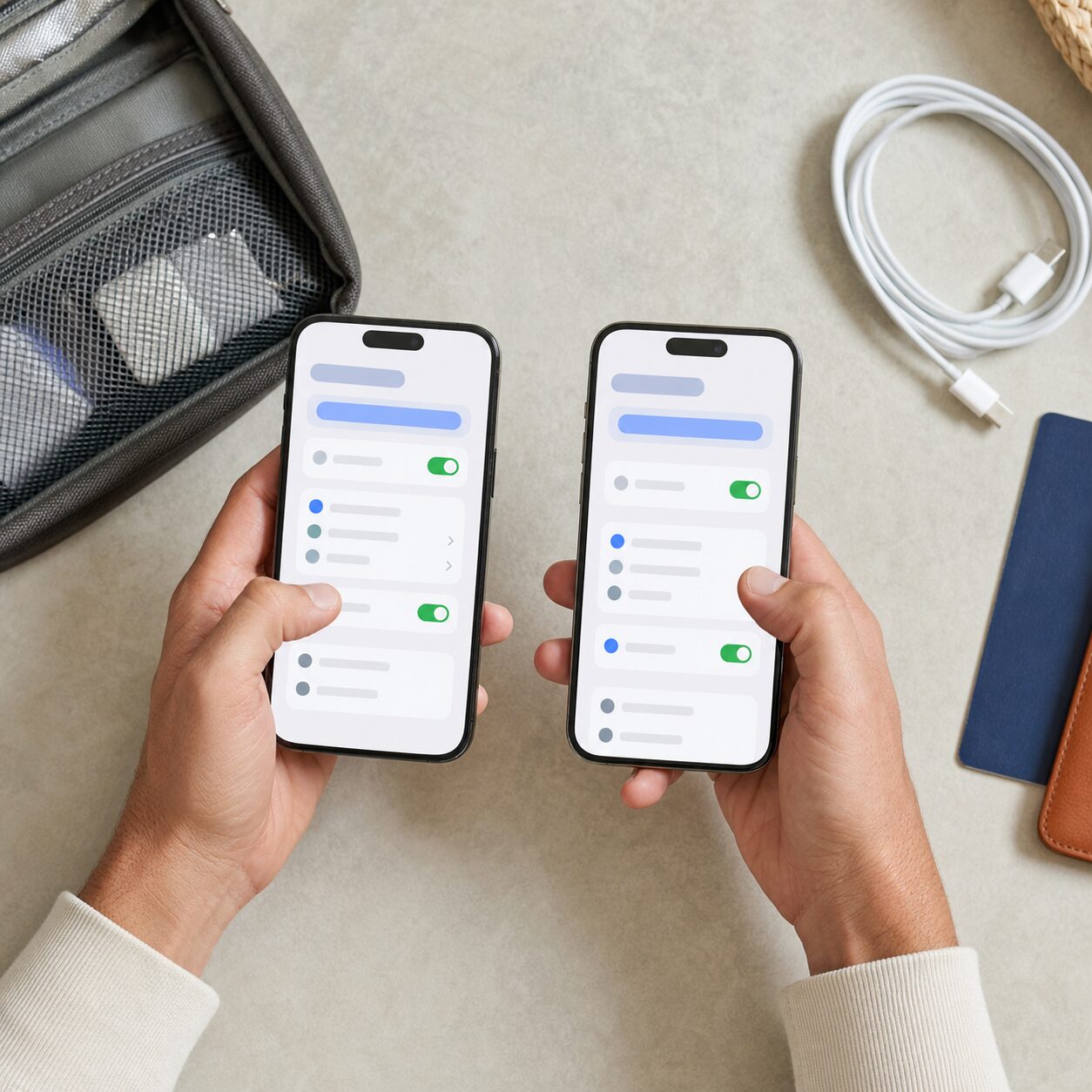
During installation, give the profile a clear name such as “Spain July” or “Japan Data.” Rename the home line “Home Number.” Labels reduce mistakes when the menus later ask for the default voice line, mobile data line and messaging line.
After installation, do not delete the new profile merely because it does not connect at home. A destination plan may need to see its partner network before it becomes usable. Deleting it can consume a one-time installation and require support to issue another profile.
Update the phone before the trip, restart it after major configuration changes, and keep the provider’s manual network-selection and access-point instructions offline. Most users will never need those details. The person who does need them will usually be standing under fluorescent airport lighting with 9 per cent battery.
Check 5: assign data, calls and messages deliberately
Dual-line phones typically ask several separate questions. Choose the travel eSIM for mobile data if that is its purpose. Keep the home number as the default voice line if you need incoming calls or familiar caller identification, but understand the home carrier’s roaming charges for calls and texts. Receiving SMS may be free on some plans and chargeable on others; verify rather than guess.
Turn off data roaming on the home line unless the home carrier explicitly requires it for an included roaming plan. Turn on data roaming for the travel eSIM only if its provider instructs you to do so. This sounds backwards, but many travel eSIMs connect through roaming agreements and therefore need that switch.
Consider disabling “mobile data switching” or the similarly named feature. When enabled, the phone may use the other line’s data to improve service during a call. That can be convenient at home and expensive abroad. Again, exact behaviour depends on device and carrier.
Messaging platforms deserve a pre-trip test. Services tied to the home number can continue over the travel data connection, but changing defaults or removing a line may trigger re-registration. Keep the home line installed unless there is a clear reason not to, and avoid unnecessary account changes during the trip.
Check 6: protect verification codes and account recovery
A phone number is often treated as a key to email, banking, social media and travel accounts. That makes line management a security decision, not merely a data purchase. The US Federal Trade Commission warns that criminals can use SIM-swap attacks to take over a number and receive texted verification codes.
Before travel, put a PIN or password on the mobile-carrier account where available. Use a strong unique password. For sensitive accounts, prefer an authenticator app, passkey or security key over SMS when the service supports it. Save recovery codes offline in a protected place accessible to the account owner.
Do not send an eSIM activation QR code to a family group chat that includes casual contacts or cloud-synced devices you no longer control. Treat activation details like a credential. If the home line suddenly loses service and the carrier reports activation on another device, contact the carrier immediately, then secure email and financial accounts.
Children and teenagers need a simpler instruction: never read a verification code to someone who calls or messages, even if the person claims to be support. Real support may verify an account through approved steps; an unsolicited request for a one-time code is a reason to stop and ask a parent.

Check 7: test the setup as a family system
Once at the destination, turn off Wi-Fi briefly and confirm that mobile data works on the intended line. Open a lightweight website, send a family message, test navigation, and check the provider dashboard. Then call the home number from another phone if preserving calls matters. A status icon alone does not prove the right line is carrying the right traffic.
Give each traveller an age-appropriate test. An adult should know how to view data usage, contact support and switch back to the home line. A teenager should know the plan name, the family meeting point and what not to change. A younger child with a connected device may only need to know that mobile settings are adult territory.
If one parent’s phone is the sole hotspot, ticket wallet, payment device, translator and navigator, the family has created a very efficient single point of failure. Split critical functions. Put boarding passes on both adults’ phones, store the accommodation address offline, and let another device hold key contact information.
When service fails, change one thing at a time: confirm airplane mode is off, mobile data is on, the intended line is active, roaming matches provider instructions, and the destination is covered. Restart the phone. Then use the provider’s official troubleshooting steps. Randomly flipping every switch produces mystery, not diagnosis.
Check 8: set data limits, privacy habits and battery expectations
Use the provider dashboard and the phone’s data counter, remembering that their measurement periods may differ. Set usage alerts where available. For a shared family allowance, decide who checks the balance and when. A two-minute evening check is easier than negotiating the last 200 megabytes on the train to the airport.
A travel eSIM does not make public Wi-Fi safe. Keep the device updated, use encrypted sites and apps, and avoid installing unknown certificates or configuration profiles offered by pop-ups. Join networks through details provided by the hotel, airport or venue, not by selecting the most convincing name in a crowded list.
Dual-line operation, weak coverage, navigation and hotspot use can increase battery drain. Carry an airline-compliant power bank, reduce background refresh, and download what you can. Connectivity that ends at 4 p.m. because the battery is flat is technically still connectivity, but it will not feel like it.
If the provider app requests broad permissions unrelated to activation or account management, pause and investigate. Buy through the provider’s official site or verified app listing, check refund and support terms, and avoid deals delivered through unsolicited messages.
Check 9: prepare for loss, failure and the trip home
Back up the phone and enable its official find-my-device feature before departure. Use a strong screen lock; the FTC recommends at least a six-digit passcode. Record device and carrier support details somewhere other than the device itself. If a phone is lost, another adult should be able to lock it, contact the carrier and reach essential accounts.
Keep offline copies of tickets, insurance details, the accommodation address, emergency contacts and the next travel segment. A paper card with two phone numbers and the hotel address is not retro; it is a tiny disaster-recovery system that works without charging.
On return, confirm that the home line is active and selected for mobile data. Disable or delete the travel profile only after service is restored and the provider’s reuse policy is understood. Some profiles can be topped up for another trip; others cannot be reinstalled after deletion. Turn off automatic renewal in the provider account if you do not want it.
Check the next home-carrier bill and the travel-provider receipt. Unexpected charges are easier to challenge with screenshots of plan terms and settings. Remove shared screenshots containing activation credentials, and review which family devices still have access to travel accounts.
A practical 48-hour family setup plan
| When | Action | Proof it worked |
|---|---|---|
| Several days before | Confirm model, unlock status, coverage, validity and inclusions | Saved official answers and receipt |
| 48 hours before | Update, back up, install and label profiles | Both lines appear with clear names |
| 24 hours before | Download maps, tickets and entertainment; secure accounts | Critical files open in airplane mode |
| On arrival | Select travel data, apply roaming instructions and test | Web, maps and family messages work without Wi-Fi |
| During trip | Check usage and preserve battery | Allowance and renewal status are known |
| On return | Restore home data, disable travel line and inspect charges | Normal service works before profile removal |
The plan is intentionally unglamorous. It shifts decisions to a calm room with Wi-Fi and moves proof—screenshots, offline files and tests—closer to each decision. That is far more useful than memorising one perfect set of switches, because phones and carrier instructions change.
Official sources worth saving
- Apple Support, using eSIM while travelling internationally: https://support.apple.com/en-us/118227
- Google Pixel Help, eSIM information and international travel: https://support.google.com/pixelphone/answer/16115741?hl=en
- European Commission, roaming in the EU: https://digital-strategy.ec.europa.eu/en/policies/roaming
- US Federal Trade Commission, protecting a phone: https://consumer.ftc.gov/articles/how-protect-your-phone-hackers
- US Federal Trade Commission, two-factor authentication: https://consumer.ftc.gov/articles/use-two-factor-authentication-protect-your-accounts
These sources explain general device, roaming and security principles. Your home carrier and eSIM provider control the commercial details of your plan, while local rules may affect registration, emergency calling and service availability.
Three common questions before you tap “activate”
Can I keep my normal number while using a travel eSIM?
Often, yes, if the phone supports dual SIM and both lines can remain active. You can commonly keep the home line for calls and messages while assigning mobile data to the travel line. However, calls, voicemail and SMS on the home line remain subject to the home carrier’s roaming terms. Confirm charges and disable home-line data roaming unless your carrier tells you otherwise.
Should I install the eSIM before leaving home?
Usually it is wise to install on reliable Wi-Fi before departure, but the plan’s validity rule decides when to activate it. Some plans begin at installation; others begin at the first connection in the destination. Follow the provider’s written instructions, retain the activation details, and do not delete a profile merely because it cannot connect in your home country.
What if the travel eSIM does not work after landing?
Confirm the correct line is active and selected for mobile data, then apply the provider’s data-roaming and network-selection instructions. Toggle airplane mode, restart the phone and test without Wi-Fi. Avoid changing several settings at once. If it still fails, use official support from a second device or trusted Wi-Fi and provide the order number, device model and screenshots that do not expose credentials.
The calmest phone is the one with a backup
A good travel eSIM setup is not defined by the number of bars on the first screenshot. It is defined by whether every traveller can reach the family, open essential documents, navigate, protect accounts and recover when one component fails.
Verify compatibility, make each line’s job explicit, test the real tasks, and preserve an offline route home. Prices and menus will change; that method travels well. With those checks complete, put the phone away for a while. The point of arranging connectivity is to make the trip easier, not to turn the family holiday into a roaming-settings seminar.