Your old tablet isn’t obsolete just because it can no longer run the latest high-end games or heavy multitasking apps; it is actually a versatile, low-power computer waiting for a new purpose in your home.
- Performance vs. Purpose: Aging hardware struggles with modern bloatware but excels at single-task functions like displaying photos or controlling smart home devices.
- Security First: Always perform a factory reset and remove your personal accounts before repurposing a device to ensure your data remains private.
- Longevity Hacks: Use dedicated stands, protective cases, and light-weight “kiosk” apps to turn tablets into permanent home fixtures.
We have all been there: you open that “junk drawer” in the kitchen or the back of your home office closet, and there it is. A tablet from 2016. The screen has a tiny scratch, the battery doesn’t hold a charge for more than three hours, and it takes a full minute just to open a web browser. It feels too functional to throw in the trash, but it’s too slow to be your primary device. In a world where we are increasingly conscious of e-waste and the environmental impact of our gadgets, tossing it out feels wrong. But what can you actually do with it?
The secret to upcycling technology is to stop asking your device to do everything and start asking it to do one thing exceptionally well. By stripping away the need for high-speed processing and heavy app updates, you can extend the life of your hardware by years.
Understanding the Limits of Your Aging Hardware
Before we dive into the projects, we need to address the “why.” Why does a tablet that feels sluggish when browsing the web work perfectly as a digital photo frame? The answer lies in the resource demands of modern software.
Most of the “slowness” you experience on an older tablet is not actually the fault of the physical hardware. It is the fault of the operating system and the apps. Modern versions of Android and iPadOS are designed for processors that are significantly faster than the ones inside devices from five or six years ago. When you open a modern browser, it expects to load high-resolution ads, complex tracking scripts, and heavy media—all of which choke an older processor.
However, if you strip that tablet down to a single function—like displaying a static image or playing a local music file—the hardware is more than capable. You are effectively “de-bloating” the device by limiting its scope.
Step 1: The Essential Cleanup Before You Begin
Before you turn that old tablet into a smart home hub, you must treat it like a fresh start. Whether you are keeping it for your own use or passing it down to a child, security is the first priority. If you leave your personal accounts logged in, you risk accidental purchases, data breaches, or unwanted access to your primary cloud services.
| Action Item | Why It Matters |
|---|---|
| Factory Reset | Clears all personal data and temporary cache files that slow down the system. |
| Update OS (If Possible) | Installs the latest security patches available for that specific model. |
| Disable Auto-Updates | Prevents the device from trying to download software it can no longer handle. |
Once the device is reset, avoid logging into your primary Google or Apple ID unless absolutely necessary. For a dedicated photo frame or a kids’ game tablet, creating a secondary, “empty” account is a safer bet. This ensures that if the tablet is lost or compromised, your primary digital life remains untouched.
1. The Digital Kitchen Companion

How many times have you been cooking, hands covered in flour, trying to read a recipe off a smartphone screen that keeps turning itself off? A repurposed tablet is the ultimate kitchen assistant. It provides a large, clear screen for reading instructions without the constant notifications of your main phone.
The trick here is mounting. You don’t want it sitting flat on the counter where it can get splashed. Look for magnetic wall mounts or simple under-cabinet tablet holders. By keeping the tablet plugged in, you can set the “Auto-Lock” (or “Sleep”) feature to “Never” in the display settings. This keeps your recipe visible exactly when you need it.
2. A Dedicated Smart Home Control Hub
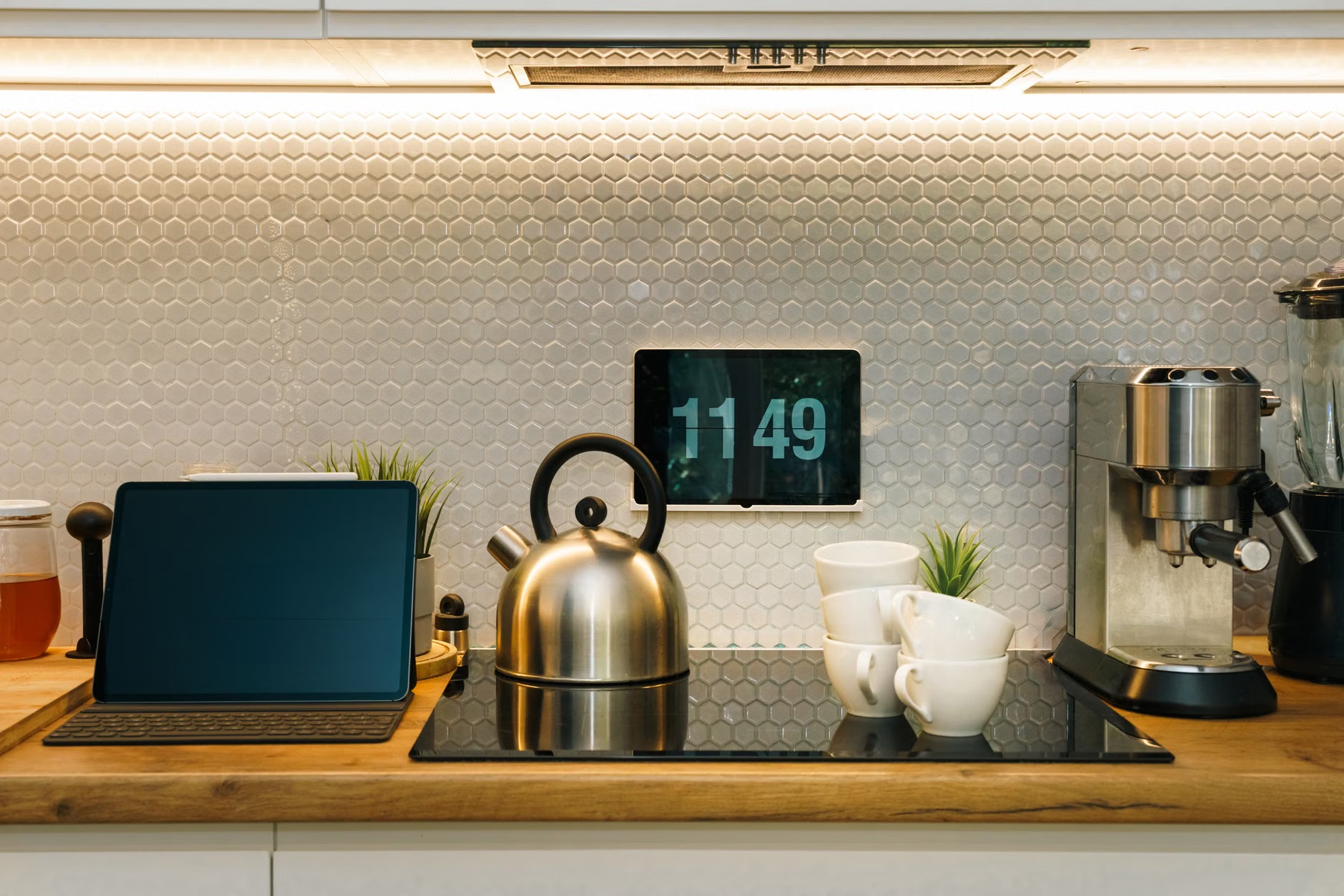
If you have invested in smart lights, thermostats, or security cameras, you know the frustration of having to pull out your phone, unlock it, and find the right app just to dim the lights. An old tablet can act as a permanent, wall-mounted control panel.
Most smart home platforms (like Google Home or Amazon Alexa) allow you to create a “dashboard” view. You can mount the tablet in your hallway or near your front door. Use a “Kiosk” mode app to lock the tablet to that single control screen. This way, any family member—even those without a smartphone—can adjust the house temperature or check the front door camera feed.
3. The “Distraction-Free” Kids’ Learning Station

Modern tablets are full of distractions: social media, news alerts, and endless emails. If you want to give your child a device for educational purposes, an old tablet is actually better than a new one. By removing everything except for a few curated educational apps—like math games, reading tools, or drawing software—you turn the device into a focused tool rather than a consumption trap.
Use “Guided Access” (on iPad) or “App Pinning” (on Android) to lock the child into a specific app. This prevents them from exiting the game and wandering into the settings menu or the web browser. Pair this with a rugged, shock-proof case, and you have a durable learning tool that you won’t worry about if it gets dropped.
4. A High-End Digital Photo Frame
Digital photo frames sold in stores are often expensive and have lower-quality screens than the tablets we already own. Why buy a low-resolution frame when you can repurpose a high-definition tablet?
There are several apps designed specifically for this purpose. They allow you to pull photos directly from your cloud storage (like Google Photos or iCloud) and cycle through them. Because you are using the tablet’s native display, the colors will be more vibrant than almost any dedicated digital frame on the market. Just remember to set the screen brightness to a moderate level so it doesn’t become a glaring light in your living room at night.
5. An External Monitor for Your PC
If you are working from home and find yourself wishing you had just a bit more screen space for your Slack messages or a calendar, you can use your tablet as a secondary monitor. Apps like Spacedesk or Duet Display allow you to connect your tablet to your laptop or desktop via Wi-Fi or USB.
This is a fantastic way to utilize an old tablet that might be too slow for standalone apps but still has a perfectly functional screen. It turns your “e-waste” into a productivity booster for your home office.
6. A Dedicated Music or Podcast Player
Stop using your phone to play music through your home speaker system. When you use your phone, every text message or notification interrupts the audio. By dedicating an old tablet to your music streaming service (Spotify, Apple Music, or Tidal), you create a “music-only” device.
If you have an older tablet that doesn’t support the latest app versions, you can still use it as a high-quality MP3 player for local music files or use the web player version of your favorite streaming service. Connect it to a Bluetooth speaker or a pair of wired speakers, and you have a permanent home stereo interface.
7. A Dedicated Security Camera Monitor
If you have a baby monitor or a security camera at your front door, you can use an old tablet as a 24/7 monitor. Many security camera apps have a “live view” mode that is designed to stay on. By placing the tablet on a nightstand or a desk, you can keep an eye on things without needing to constantly check your phone.
This works especially well in a nursery. Instead of buying a separate, expensive baby monitor, you can use a high-quality tablet screen to watch the feed. Just ensure the tablet is plugged into a power source, as video streaming will drain the battery quickly.
Common Pitfalls and How to Avoid Them
Upcycling is rewarding, but it isn’t without its challenges. The most common issue is battery health. Lithium-ion batteries degrade over time, especially if they are kept at 100% charge for years. If you plan to keep your tablet plugged in 24/7, consider using a smart plug that turns off the power for a few hours at night, or use a “battery charge limiter” app if your device supports it. This helps prevent the battery from swelling, which is a common risk for aging, permanently-plugged-in electronics.
Another issue is “app rot.” As developers stop supporting older versions of their apps, you might find that your favorite app suddenly stops working. When this happens, don’t give up. Look for an open-source alternative or a web-based version of the service. Often, the web browser on an old tablet is the most resilient tool you have.
The Environmental Impact of Your Choice
E-waste is one of the fastest-growing waste streams in the world. By keeping your tablet in use for an extra three or four years, you are significantly reducing your personal carbon footprint. The manufacturing process of a single tablet requires rare earth metals, water, and significant energy. Extending the life of that device is arguably the most “green” tech decision you can make.
When the device finally does reach the end of its life—perhaps the screen dies or the battery no longer holds any charge at all—please do not put it in your regular trash. Look for certified e-waste recycling centers in your area. Many retailers also offer trade-in or recycling programs that ensure the components are broken down safely and responsibly.
Final Thoughts
The next time you look at that drawer full of “obsolete” tech, don’t see e-waste. See a collection of specialized tools. Whether it’s a digital photo frame, a kitchen assistant, or a smart home controller, your old tablet still has plenty of life left to give. It’s about shifting your mindset from “latest and greatest” to “functional and sustainable.” Take your time, set it up for a specific task, and enjoy the satisfaction of getting more out of the technology you already own.
Frequently Asked Questions
Q: Will an old tablet slow down my Wi-Fi?
A: No, using an old tablet for a single task like a photo frame or music player will have a negligible impact on your home network. The data usage for these tasks is very low compared to modern streaming or gaming.
Q: Is it safe to leave an old tablet plugged in 24/7?
A: Generally, yes, but there is a risk of battery swelling in very old devices. To be safe, try to use a smart plug to cycle the power, or use a dedicated charger that prevents overcharging. If you notice the back of the tablet bulging, stop using it immediately and recycle it.
Q: What if the apps I need are no longer supported on my old OS?
A: This is common with older devices. Try using the tablet’s web browser to access the mobile website version of the service. Many services, like Spotify or Google Photos, work perfectly well in a browser even when the standalone app is no longer compatible.
Official Resources:
For more information on safe e-waste disposal, visit The EPA’s Electronics Donation and Recycling page.