- Data Sovereignty Matters: Choosing an ‘Open-API’ system ensures your family’s environmental data stays under your control, rather than being harvested by third-party cloud servers.
- Automation Beyond Notifications: Open-API integration allows your sensors to trigger physical actions—like turning on an air purifier or HRV unit—automatically when thresholds are breached.
- Future-Proofing Your Home: Systems that offer open access to data prevent “vendor lock-in,” meaning you can switch hardware later without losing your historical environmental records.
If you have ever spent a restless night wondering if the air in your child’s bedroom is too dry, or if that lingering cooking smell is actually a sign of poor ventilation, you have likely scrolled through dozens of “smart” home monitors. Most of these devices come with a shiny app, a monthly subscription, and a promise of “peace of mind.” But there is a catch: most of them are walled gardens. Once you buy into a specific ecosystem, you are stuck with their limitations, their cloud storage policies, and their specific way of interpreting data. This is where the concept of “Open-API” (Application Programming Interface) monitoring changes the game for parents and homeowners in their 30s and 40s who value efficiency, privacy, and long-term utility.
When we talk about “Open-API,” we aren’t suggesting you need a computer science degree. We are talking about devices that allow you—or the software you choose to run—to talk to your hardware directly. It is the difference between being a tenant in a smart home and being the landlord.
Why Open-API Systems Outperform Proprietary Gadgets
For most of us, “smart home” has become synonymous with “app-controlled.” You buy a sensor, you download an app, and you get a push notification when the humidity drops. But what happens when that company goes bust, or decides to put their features behind a paywall? Or worse, what happens when you want to link your air quality monitor to a different brand of smart plug or HVAC controller?
An Open-API system is built on the principle of interoperability. It exposes the raw data—the CO2 parts per million (ppm), the volatile organic compound (VOC) levels, the precise temperature—so that other devices in your home can react to it. If you have an Open-API air quality monitor, you can write a simple rule: If CO2 exceeds 1,000 ppm, turn on the bathroom exhaust fan or the HRV (Heat Recovery Ventilation) unit.

This is not just about convenience; it is about responsiveness. A notification on your phone is reactive—you have to see it, decide to act, and then go do it. An integrated Open-API system is proactive. It acts on your behalf, ensuring that your home environment is consistently healthy without you having to touch a screen. This is crucial for parents of young children or those managing asthma or allergies, where keeping VOCs or humidity within a strict range can have a tangible impact on sleep quality and respiratory health.
The Hidden Cost of “Walled Gardens”
Most commercial smart monitors rely on “Cloud-to-Cloud” integration. Your sensor sends data to the manufacturer’s server, and then to your phone. If the internet goes down, your “smart” home stops being smart. Furthermore, you are trusting a third party with granular data about when you are home, when you are cooking, and when you are sleeping. An Open-API approach often allows for “Local-Only” control. The data travels from the sensor to your local hub (like Home Assistant or a local server) and never leaves your home network. This keeps your family’s habits private and ensures your system works even if your ISP has an outage.
Understanding the Mechanics: What You Need to Get Started
You don’t need to be a developer to leverage Open-API sensors. The market has shifted significantly in the last few years, with several manufacturers now catering to the “prosumer” market. When evaluating a device, look for keywords like “Local API,” “MQTT support,” or “Home Assistant integration.” These are the golden tickets.
The setup generally involves three components:
- The Sensor Hardware: Devices that measure particulate matter (PM2.5), TVOCs, CO2, temperature, and humidity.
- The Hub/Controller: Software like Home Assistant, Hubitat, or even a simple Raspberry Pi running custom scripts.
- The Integration Layer: The bridge that allows the hub to talk to the sensor using its API.
Let’s look at a realistic scenario. Imagine you have a toddler who is prone to respiratory issues. You want to ensure the air in the nursery stays between 40% and 50% humidity. With a standard proprietary monitor, you’d have to manually check the app and turn on the humidifier. With an Open-API setup, you set an “automation rule.” When the sensor reports humidity below 40%, the smart plug connected to the humidifier turns on automatically. When it hits 50%, it turns off. You don’t have to think about it. The system is always working to maintain the environment you’ve defined as “healthy.”
Common Pitfalls and How to Avoid Them
The most common mistake people make is buying the “coolest looking” gadget on Amazon without checking if it has an API. A device might have a beautiful screen and a great app, but if it doesn’t allow local access to the data, it is a dead end. Before buying, check community forums. If the device is popular in the “Home Assistant” or “OpenHAB” communities, you can be certain it has a robust, well-documented API.
Another pitfall is over-complication. Start small. You don’t need to automate your entire house in a weekend. Start by monitoring one room—the nursery or the home office. Once you get comfortable with how the data flows, you can expand to other areas of the home. Reliability is key; avoid DIY sensors that require constant soldering or troubleshooting unless you enjoy that as a hobby. Stick to commercial-grade sensors that offer open access to their data.
Comparing Proprietary vs. Open-API Systems
To help you decide which path is right for your family, consider the following comparison. While proprietary systems offer a lower barrier to entry, they often lack the long-term flexibility that a growing family needs.
| Feature | Proprietary System | Open-API System |
|---|---|---|
| Setup Difficulty | Easy (Plug and play) | Moderate (Requires configuration) |
| Data Privacy | Cloud-based (Third-party access) | Local (You own the data) |
| Automation | Limited to manufacturer ecosystem | Unlimited (Works with any device) |
| Vendor Lock-in | High | Low |
| Reliability | Dependent on internet connection | Local-control (Works offline) |
As the table highlights, the trade-off is almost entirely between “ease of use” and “control.” If you are the type of person who values knowing exactly how your data is used and wants to build a system that evolves with your home, the Open-API route is objectively superior. If you just want a quick, “it-works-out-of-the-box” solution and don’t mind the cloud, proprietary might suffice—but be aware that you are essentially renting your smart home features.

The Long-Term Value of Data Ownership
Why should you care about historical data? Many people treat air quality monitors as “real-time” tools. They look at the current CO2 level and move on. However, the real value of an Open-API system is the ability to export and analyze your own data over months or years. By logging your home’s environmental patterns, you can identify trends that aren’t obvious in the moment.
For example, you might discover that your home’s VOC levels spike every Tuesday morning. Why? Perhaps that’s when a specific cleaning product is used, or when the local waste collection happens, or when the wind direction shifts. With your own data, you can correlate these events and take action—like moving the cleaning schedule or installing better weather stripping on a specific window. This level of insight is rarely available in proprietary apps, which often delete or hide data older than a few weeks unless you pay for a subscription.
Designing Your Home for Health
When you have access to your own data, you move from “monitoring” to “managing.” This is the core shift in mindset. A healthy home isn’t just about having a monitor on the wall; it’s about understanding the relationship between your home’s construction, your daily habits, and the air you breathe. If you see that your CO2 levels are consistently high in the bedrooms at night, you might realize that your home is too airtight and requires a better ventilation strategy, such as an ERV (Energy Recovery Ventilator) or simply ensuring that interior doors are left open to improve airflow.
This is not just “tech talk.” This is foundational health. Poor indoor air quality is linked to headaches, fatigue, and poor sleep—all of which are things parents in their 30s and 40s already struggle with enough. By using Open-API systems to automate the management of these variables, you are effectively buying back your mental energy.
Practical Steps to Build Your Own Monitoring System
If you are ready to take the leap, where do you actually start? You don’t need a server rack in your basement. A single, dedicated device—like a small, low-power mini-PC or even a Raspberry Pi—can run the necessary software to manage your sensors for years without significant power draw.
- Select Your Hardware: Look for sensors that explicitly mention API documentation or Home Assistant compatibility. Popular choices include air quality monitors from companies like AirGradient (which are open-source and highly regarded) or sensors that use the ESPHome firmware.
- Choose Your Platform: Home Assistant is the gold standard for this. It is free, open-source, and has a massive community that can help you if you get stuck. It acts as the “brain” of your home, collecting data from your sensors and sending commands to your other devices.
- Establish Your Rules: Don’t try to automate everything at once. Start with one “If-This-Then-That” rule. For example: “If PM2.5 > 15, turn on the air purifier to medium.”
- Review and Refine: After a week, look at your logs. Is the air purifier running too often? Is it noisy at night? Adjust your thresholds. This feedback loop is the beauty of a system you control.
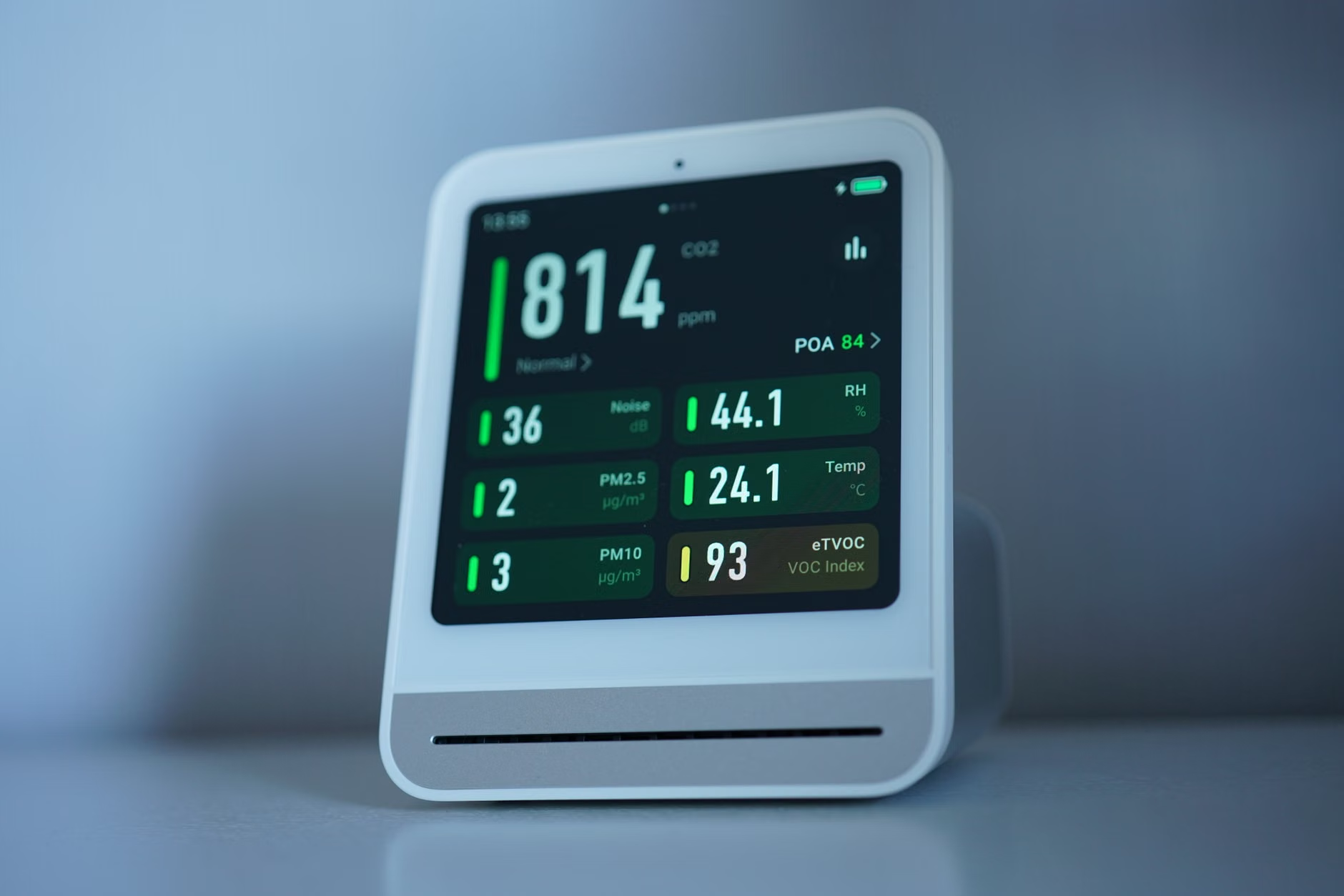
The beauty of this approach is that it is modular. If a new, better sensor comes out next year, you can replace just the sensor and keep your entire automation logic intact. You aren’t forced to migrate your data or learn a new app. You are building a system that is yours, tailored to your family’s unique needs.
Addressing Potential Hurdles
It is important to be realistic about the learning curve. While you don’t need to be a coder, you do need to be comfortable with the idea of “configuring” rather than “consuming.” You will occasionally run into a situation where a device stops communicating, or an update changes a setting. This is the trade-off for not having a corporate customer service department to blame. However, the trade-off is that you have a system that is incredibly robust and respects your privacy.
For those who feel intimidated, look for “pre-integrated” solutions. Some companies provide kits that are essentially “Open-API out of the box.” You assemble them, plug them in, and they work with standard protocols like MQTT. These represent the best of both worlds: the reliability of a manufactured product and the flexibility of an open ecosystem.
Also, consider the “Wife/Husband/Partner Factor.” If your partner finds the system too complex to use, it will fail. Ensure that any automation you build has a manual override. If you automate the lights or the HVAC based on air quality, ensure that a physical switch still works. The technology should be invisible and helpful, not a source of friction in the household.
Final Thoughts on Smart Home Sustainability
We are living in an era where “smart” often means “disposable.” We buy a device, use it for two years, and then it becomes e-waste because the company stopped supporting the app. Open-API environmental monitoring is the antidote to this. By choosing hardware that gives you access to the data, you are making a choice for sustainability. You are choosing a system that can grow with you and that doesn’t rely on the continued existence of a specific startup to function.
As you navigate the demands of parenting and career, the goal should be to create a home that supports you. A healthy environment—monitored, managed, and optimized—is one of the most effective ways to do that. It’s not just about the numbers on a screen; it’s about the quality of the air your family breathes while they sleep, work, and play. Take control of your data, and you’ll find that the “smart” in smart home finally starts to feel truly intelligent.
For further reading on how to integrate these systems, you can explore the official documentation for Home Assistant, which provides extensive guides on connecting various IoT devices, or check out the open-source hardware community at AirGradient, which offers excellent resources for building your own air quality monitors.
Frequently Asked Questions
Q: Do I need to be a programmer to set up an Open-API air quality monitor?
A: Not at all. Many Open-API devices are designed for enthusiasts but have become very user-friendly. If you can follow a step-by-step guide and use a web browser to change settings, you have all the skills required to get started with platforms like Home Assistant.
Q: Will my data be less secure if it is local?
A: Actually, it is often more secure. When your data stays on your local network, you aren’t sending sensitive information about your daily habits to a third-party cloud server that could be breached. You are the only one with access to your data.
Q: What happens if the internet goes down?
A: If you use a local-control Open-API system, your automations will continue to work perfectly fine. The devices communicate with your local hub directly, so your home’s air quality management remains active even without an internet connection, unlike most cloud-dependent proprietary systems.
Disclaimer: This article is for informational purposes and does not constitute professional home engineering or medical advice. Always follow manufacturer instructions for device safety and consider consulting a professional for complex HVAC integrations.