The most effective way to design a shared family study room is to prioritize modular flexibility over fixed, built-in furniture, allowing your space to evolve as your children grow and your work needs shift.
- Choose Height-Adjustability: Investing in a standing-desk frame for your main workstations is the single most important factor for long-term ergonomics as children hit growth spurts.
- Decouple Power from Furniture: Use modular cable management trays and clamp-on power strips to keep your desk surface clean and future-proof your tech setup.
- Prioritize “Zoning” over “Surface Area”: Use modular partitions or shelf dividers to separate a parent’s focused work area from a child’s homework station to minimize visual distractions.
If you are in your 30s or 40s, you likely know the struggle of the “study room shuffle.” One day it’s a quiet space for your remote work; the next, it’s a chaotic landscape of craft supplies, school textbooks, and half-finished science projects. The traditional “desk-against-the-wall” setup rarely survives the reality of a modern family, where the room needs to be a multi-purpose hub.
The shift toward “Modular-Tech” furniture is changing how we handle this. Instead of buying a massive, expensive wooden desk that you’ll have to replace in five years, you invest in a system of independent components—frames, tabletops, and storage units—that can be reconfigured, expanded, or moved as needed. Let’s break down how to actually build this.
Why Modular Design Beats Fixed Furniture for Families
Most of us treat furniture as a “set it and forget it” purchase. We buy a desk, we move it into the room, and we live with its limitations for a decade. In a family home, this is a mistake. Your child’s needs at age 7 (a space for drawing and basic tablet use) are vastly different from their needs at age 14 (a space for high-intensity gaming or complex coding projects).
Modular-Tech systems are built on the principle of interchangeable parts. You start with a basic frame. If you need more length, you add a bridge piece. If you need storage, you mount a drawer unit directly to the frame rather than buying a separate cabinet. This is not just about aesthetics; it is about longevity and cost-efficiency.
Consider the “Lifecycle Cost” of your furniture. A cheap particle-board desk might cost $150 but will likely show signs of sagging or hardware failure within three years under heavy use. A modular metal-frame system might cost $500 initially, but because you can swap out the tabletop, upgrade the legs to motorized ones, or add side extensions, its useful life can span 15-20 years. That is a significant reduction in long-term expenditure.

The Anatomy of a Modular-Tech Setup
To build a setup that serves both parents and kids, you need to focus on four critical components: the frame, the surface, the power system, and the storage modules. Every piece should be able to move independently.
1. The Motorized Foundation
If you do nothing else, ensure the desk frames have height-adjustable motors. While this is often marketed as a “health benefit” for adults, it is a game-changer for families. A child growing from 4 feet to 5 feet 5 inches needs a desk that grows with them. A standard fixed-height desk (usually 29-30 inches) is often too high for younger children, leading to poor posture and neck strain. A motorized frame allows you to lower the desk for homework and raise it for your own work hours.
2. Universal Power and Cable Management
The biggest enemy of a shared room is cable clutter. When you have multiple laptops, monitors, tablets, and charging stations, the desk becomes a tangle of wires. Modular-tech solutions use under-desk cable trays and clamp-on power strips. By keeping the power source attached to the desk frame rather than the wall, you can move the entire desk setup without unplugging your life. This is essential for families who occasionally need to rearrange the room for guests or deep cleaning.
3. Surface Material Selection
Avoid high-gloss surfaces or delicate veneers. In a family study room, the desk will eventually be used for art projects, glue, and markers. Look for High-Pressure Laminate (HPL) or solid bamboo. HPL is remarkably resistant to heat, moisture, and scratches. If you have a child who likes to use markers, HPL surfaces are generally easier to clean without stripping the finish.
4. Modular Storage Attachments
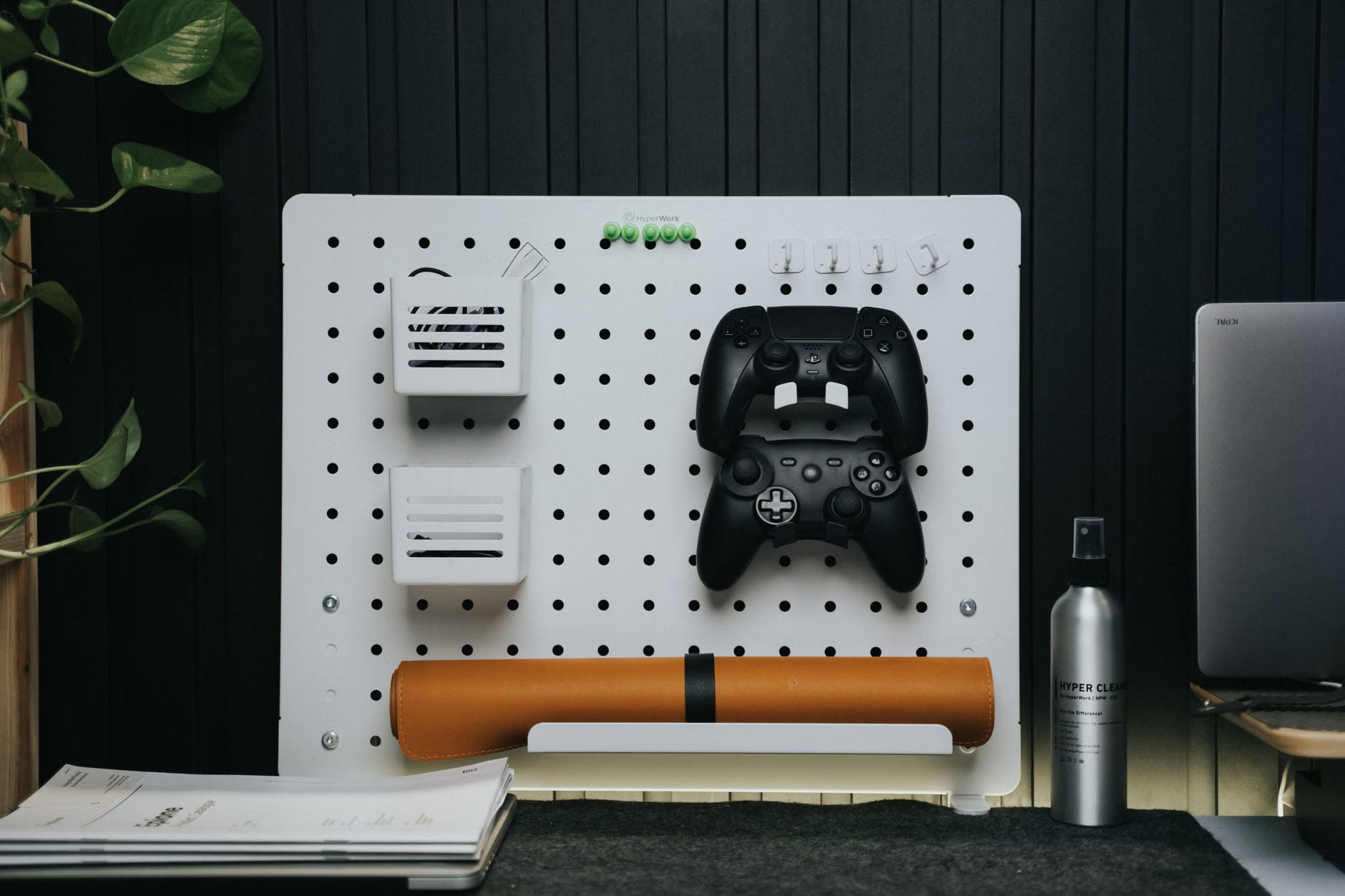
Storage should be “off the floor.” By using pegboards, side-mounted drawer units, and headphone hangers that clamp onto the desk edge, you keep the floor space open. This makes the room feel larger and makes vacuuming significantly faster—a minor detail that matters when you are trying to keep a shared room tidy.

Planning Your Layout: The “Zone” Strategy
A common mistake in shared study rooms is placing desks side-by-side in a long, unbroken line. While this looks clean in a catalog, it often creates friction in real life. If your child is working on a loud video project while you are on a conference call, you are both going to be frustrated.
Use a “Back-to-Back” or “L-Shaped” configuration instead. If the room is large enough, placing desks back-to-back (separated by a acoustic panel or a bookshelf) allows both parties to have their own “focus zone” while still being in the same room. This provides a sense of enclosure for the child, which is often helpful for concentration, while keeping the parent available to help when needed.
When selecting your modular components, always check for standardized mounting holes. Most professional-grade modular systems use a 25mm or 32mm grid system. If you buy a desk from a brand that uses a proprietary system, you are locked into their accessories. If you stick to brands that follow universal mounting standards, you can buy a $20 monitor arm from a third-party vendor and it will fit perfectly.
Managing the “Tech Overload”
In a family of four, you might have four laptops, two tablets, a printer, and a shared scanner. Managing this hardware requires more than just a power strip. It requires a centralized charging station.
Dedicate one specific module—perhaps a small rolling cart or a shelf unit that sits beneath the main desk—as the “Tech Hub.” This is where all devices go at night. By centralizing the charging, you prevent the “device creep” that happens when laptops and tablets are left on every flat surface in the room. This also helps with the psychological boundary between “work time” and “rest time.” When the devices are in the hub, the desk is for working; when they are away, the desk is clear.
| Component | What to Look For | Why it Matters |
|---|---|---|
| Desk Legs | Dual-motor, 2-stage or 3-stage | Stability and speed. 3-stage legs have a wider range for children and adults. |
| Surface | High-Pressure Laminate (HPL) | Durability against spills, scratches, and common household wear. |
| Management | Clamp-on power strips | Allows for easy movement of the desk without disconnecting from the wall. |
| Storage | Clamp-on or under-mount units | Maximizes legroom and keeps the floor clear for easy cleaning. |
If you are looking at specific brands, check their “ecosystem” compatibility. Does the manufacturer offer a wide range of accessories like CPU holders, cable snakes, and privacy screens that attach to their frames? If the answer is no, you are likely buying a “dead-end” product that will limit your future options. A good modular system should look like a set of building blocks, not a finished sculpture.
Common Pitfalls and How to Avoid Them
One of the most frequent mistakes parents make is underestimating the weight load of their equipment. If you use a heavy monitor arm with a large ultra-wide screen, the desk edge needs to be reinforced. Many cheap modular desks have thin particle-board tops that will crack under the pressure of a clamp-on monitor arm. Always check the “static load capacity” of the desk frame, and ensure the tabletop is at least 1 inch thick if you plan to use clamp-based accessories.
Another issue is acoustic management. A room with multiple people typing and talking can become an echo chamber. If you are building a shared study room, do not ignore the floor and the walls. A simple high-pile rug under the desks will drastically reduce the sound of chair movement. If the room is particularly echoey, consider adding wall-mounted acoustic felt panels. These are often modular themselves and can be arranged in patterns that look like decor rather than industrial soundproofing.
Finally, consider the lighting environment. Do not rely on a single overhead light. The “Modular-Tech” approach extends to lighting too. Use clamp-on desk lamps with adjustable color temperatures. Cool white light (around 5000K) is great for focus and study, while warmer light (around 3000K) is more comfortable for late-evening work. Giving each user their own light source prevents the “who gets to control the light” argument.
The Hidden Costs of “Cheap” Solutions
It is tempting to grab the cheapest desk you can find at a big-box store. However, consider the Hidden Cost of Replacement. If you spend $200 on a desk that breaks or becomes unstable in two years, you have wasted $200. If you spend $600 on a modular system that lasts 10 years, your cost per year is $60. The modular system is actually cheaper in the long run.
Beyond money, there is the Hidden Cost of Time. Researching new desks, waiting for delivery, disassembling the old one, and disposing of it takes hours. With a modular system, you simply order a new component—like a longer tabletop or a side-mount shelf—and install it in 15 minutes. This is the definition of “future-proofing” your home.
Actionable Steps for Your Weekend Project
If you are ready to start, do not try to overhaul the whole room in one day. Start with the “Foundation.”
- Measure your space, then subtract 10%. Always leave room for movement. If you have 8 feet of wall, aim for 7 feet of desk.
- Select a high-quality frame first. Look for brands that offer a 5-to-10-year warranty on the motor and frame. This is your indicator of quality.
- Choose a neutral tabletop. You can always add a desk mat to change the color or texture. A neutral white, grey, or wood-grain finish will match any future room decor.
- Install a cable management “snake” or tray. Do this before you put the computers on the desk. It is much harder to organize cables once they are already tangled.
- Add one modular accessory at a time. Don’t buy the whole setup at once. Use the desk for a month, see where you need more storage, and then add a drawer or a shelf.
By treating your study room as a living, breathing system rather than a static room, you create a space that actually supports your family’s dynamic life. It is not about having the most expensive gear; it is about having the most adaptable setup.
Frequently Asked Questions
Q: Is it really worth paying for a motorized standing desk, or is it just a trend?
A: For a shared family room, it is worth it for the height-adjustability alone. Being able to set the desk height to the exact millimetre for a child or a parent provides better ergonomics than any chair adjustment can. The “standing” feature is a bonus, but the “custom-height” feature is the real value for families with multiple users of different heights.
Q: How do I handle different “styles” of work in the same room?
A: Use visual and acoustic barriers. A desk-mounted privacy screen (often made of felt or acrylic) is a low-cost, modular way to create a sense of separation. If your child is doing homework, a simple “Do Not Disturb” sign or a specific color of LED light on their desk can signal to the rest of the family that they are in “deep work” mode.
Q: Can I mix and match brands for a modular setup?
A: You can, but be careful. While most tabletops are universal, the connection points for frames and accessories are often proprietary. It is usually best to stick to one “ecosystem” for the frame and accessories, but you can source the tabletop from a local lumber yard or a specialized desk-top manufacturer to save money or get a better material.
For further reading on ergonomic standards and workspace design, you can refer to the official guidelines provided by the Occupational Safety and Health Administration (OSHA) Computer Workstation guidelines, which offer excellent insights into proper posture and equipment placement that apply to both home and office environments.
Building a shared family study room is a project that pays dividends in productivity and peace of mind. Start small, prioritize the foundation, and let the room grow with your family.