An E-Ink tablet is the most effective digital tool for parents looking to reduce their family’s reliance on high-stimulation screens because it replaces the addictive “infinite scroll” of smartphones with a static, paper-like interface that doesn’t trigger the same dopamine loops.
- E-Ink displays eliminate blue light and motion-based distractions, making them ideal for focused work and reading rather than entertainment.
- These devices are not replacements for tablets like iPads; they are specialized tools meant to replace paper notebooks, planners, and e-readers.
- Success depends on “device segregation”—keeping your smartphone in a different room while using the E-Ink tablet for tasks like journaling, reading, or family scheduling.
If you are in your 30s or 40s, you likely feel the constant tug-of-war between needing your devices for work or household management and wanting to set a better example for your children. We’ve all been there: you open your phone to add an item to the grocery list, and thirty minutes later, you’re knee-deep in a social media comment section or checking work emails you didn’t need to see yet. It’s not just a lack of willpower; it’s the design of modern displays. They are built to hold your attention. E-Ink, or electronic paper, flips that script entirely.
What Exactly Makes E-Ink Different from Your Phone?
To understand why E-Ink matters, you have to look at the physics of the screen. Standard tablets and smartphones use LCD or OLED panels. These screens refresh their image dozens of times per second, emitting high-intensity light directly into your eyes. This is perfect for high-definition video and fast-paced gaming, but it is chemically and neurologically taxing for the brain when you are trying to focus on a book or a list.
E-Ink technology, by contrast, uses tiny microcapsules filled with charged pigment particles. When you turn a page or write a note, the device applies an electric charge to move these pigments into place. Once the image is formed, the screen requires zero power to keep it there. It doesn’t flicker, it doesn’t emit light (unless you have a front-light turned on), and it looks almost identical to printed ink on a page.
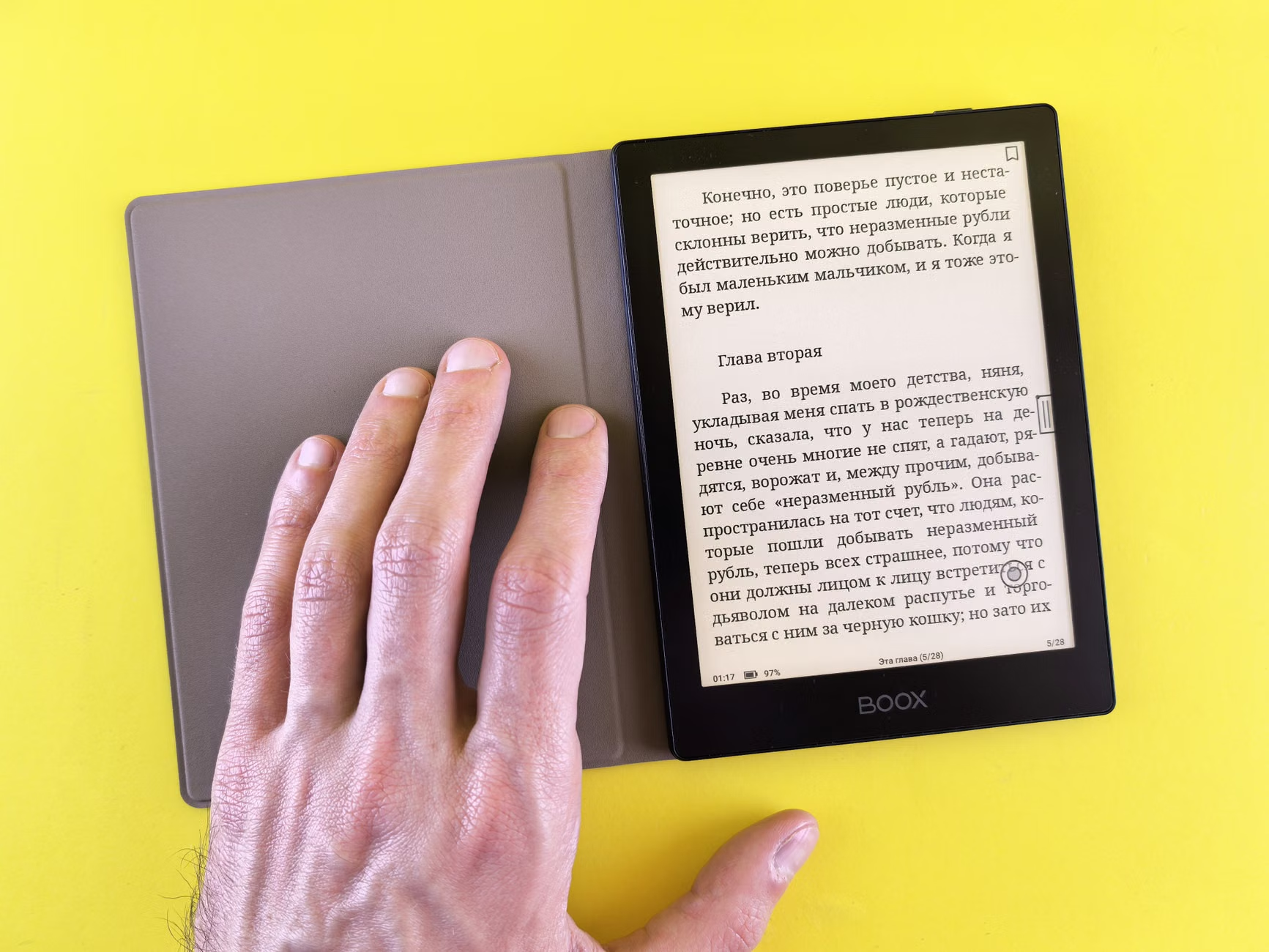
For a parent, this creates a “physical” boundary. When you look at an E-Ink screen, your brain registers it as a static document. You aren’t tempted to swipe down to refresh your news feed because the screen physically cannot update that quickly. It is essentially a “smart” piece of paper. If your goal is to reclaim your attention span, this is the single most important hardware feature you can invest in.
The Reality of Integrating E-Ink into a Busy Household
Many people make the mistake of buying an E-Ink tablet thinking it will replace their laptop. This is a common trap. If you try to use an E-Ink device for complex spreadsheets, heavy video conferencing, or high-speed web browsing, you will be frustrated. These devices are designed for input and consumption, not high-speed processing.
In a real-world family scenario, the E-Ink tablet shines in three specific areas:
- The Family Hub: Use it as a digital whiteboard. Instead of having a messy paper calendar on the fridge, use a shared, cloud-synced E-Ink tablet to track schedules, meal plans, and chore rotations. Because it’s always on, everyone in the family sees the same information without needing to unlock a phone.
- The “Deep Work” Station: If you are a parent trying to finish a project during nap time or after the kids go to bed, an E-Ink tablet allows you to draft documents, annotate PDFs, or brainstorm without the “ding” of notifications.
- The Evening Wind-Down: Instead of scrolling through news headlines before bed—which is a major cause of sleep disruption—using an E-Ink reader for books or long-form articles keeps your brain in a “reading mode” rather than an “engagement mode.”
The trade-off is that these devices require a shift in your workflow. You have to consciously decide which tasks are “phone tasks” (banking, messaging, quick lookups) and which are “focus tasks” (reading, planning, writing). If you try to force the E-Ink tablet to be a phone, you will fail. If you use it as a sanctuary from the phone, you will succeed.
Comparing E-Ink Devices: How to Choose the Right One
The market for E-Ink has expanded significantly. You are no longer limited to simple e-readers. You now have tablets that support stylus input, PDF annotation, and even cloud synchronization with platforms like Google Drive or Dropbox.
| Device Type | Best For | Key Trade-off |
|---|---|---|
| E-Reader (e.g., Kindle) | Reading novels and light articles. | Cannot easily annotate or export notes. |
| Digital Paper (e.g., reMarkable) | Writing, planning, and focus. | Higher price point; limited app ecosystem. |
| E-Ink Android Tablet (e.g., Onyx Boox) | Productivity power users who need specific apps. | More complex; higher potential for distraction. |
If you are a parent, the Digital Paper category is usually the best entry point. It offers the closest experience to pen-and-paper. It is simple, requires very little maintenance, and doesn’t tempt you with social media apps. For most people, the “E-Ink Android” tablets are a bit too similar to regular tablets, which defeats the purpose of buying one to reduce screen time.
The Hidden Costs and Overlooked Variables
One aspect that is rarely discussed in marketing materials is the ecosystem lock-in. If you buy a device that uses a proprietary format for its notes, you might find it difficult to move your family organization system to a different device later. Always check if the device allows you to export your notes as standard PDFs or text files. This is a crucial “future-proofing” step.
Another variable is the refresh rate. While modern E-Ink is fast, it is still not as instantaneous as an LCD screen. If you are someone who gets impatient with technology, the slight “ghosting” or delay in updating the screen might annoy you. This isn’t a defect; it’s a feature of the technology. It forces you to slow down. If you find yourself constantly frustrated by the screen refresh speed, it’s a sign that you are still trying to use the device with a “smartphone mindset.”

Also, consider the durability. E-Ink screens are generally more fragile than the reinforced glass on an iPad. Because they are often thinner and lack a heavy glass cover to keep the display clear, they can be more susceptible to pressure damage. If you have younger children in the house, you will need a robust case. Do not treat these like ruggedized tablets; treat them like high-end notebooks.
Steps to Successfully Transition Your Family to E-Ink
To actually see a reduction in screen time, you need a strategy. Simply buying the device won’t change your habits. Here is a step-by-step approach for a busy household:
- Define the Purpose: Before you buy, decide what the device will do. Will it be the “Family Command Center” for schedules? Will it be your dedicated “Journaling and Planning” tool? If you don’t define the role, it will end up in a drawer after two weeks.
- The “Phone-Free Zone” Rule: When you are using your E-Ink tablet, your smartphone must be in another room or in a “charging station” out of sight. The E-Ink tablet is your exit strategy from the digital noise. If your phone is right next to you, the temptation to check it will override the benefits of the E-Ink display.
- Syncing Habits: Set a specific time—perhaps Sunday evening—where you sync your E-Ink device to your cloud storage. This ensures that the digital lists you created are backed up and accessible to other family members if needed.
- The Trial Period: Commit to using the device for 21 days as your primary tool for note-taking and reading. During this time, delete the reading apps and note-taking apps from your phone. You need to create a “friction gap” that makes it easier to pick up the E-Ink device than it is to pick up your phone.
Common mistakes include trying to do too much. Don’t try to use the E-Ink tablet for email. Email is inherently high-stress and high-frequency. Keep your email on your laptop or phone, and use your E-Ink tablet for the tasks that require deep, uninterrupted thought. This separation is the secret to maintaining your sanity.
Understanding the Research: Why ‘Low-Stimulation’ Matters
There is a growing body of research regarding the impact of “high-stimulation” digital environments on the prefrontal cortex—the part of the brain responsible for executive function, decision-making, and emotional regulation. While the research is still evolving, the consensus is clear: constant task-switching and high-intensity visual stimuli (like social media feeds) degrade our ability to focus over long periods.
For parents, this is critical. When we are constantly checking our phones, we are modeling “partial attention” for our children. By using an E-Ink device, we are not just buying a piece of tech; we are creating a physical space for focus. When your child sees you reading from a device that looks like paper, they perceive it differently than when they see you hunched over a glowing screen. It changes the nature of the interaction from “distracted parent” to “engaged person.”
This isn’t about being anti-technology. It’s about being intentional about the technology we use. We are in an era where we need to curate our digital environment just as carefully as we curate the food we feed our families. E-Ink is a tool that helps us reclaim that curation.
Common Misconceptions
The most common misconception is that E-Ink tablets are “bad” because they are black and white. In reality, the lack of color is a massive advantage. Color is a primary signal for “entertainment” and “urgency.” By removing color, you remove the urge to consume mindless content. You are forced to engage with the text or the task itself. It is a form of digital fasting.
Another misconception is that these devices are “slow.” They are not slow; they are deliberate. If you expect them to behave like a 120Hz smartphone screen, you will be disappointed. But if you shift your expectations to match the speed of human thought and writing, you will find them to be incredibly fluid and satisfying.
Final Thoughts and Actionable Next Steps
If you are serious about reducing your family’s screen time, start by evaluating where the most “mindless” time is being spent. Is it reading news? Is it checking calendars? Is it jotting down thoughts that get lost in the shuffle of digital notifications? If any of these are your pain points, an E-Ink tablet is a high-value investment.
Don’t expect it to change your life overnight. It is a tool, and like any tool, it requires practice to master. Start by moving one specific workflow—like your weekly meal planning or your evening reading—to the E-Ink device. See how it feels to have that task disconnected from the internet and the constant ping of notifications.
The goal isn’t to be “tech-free.” The goal is to be tech-intentional. By choosing a lower-stimulation interface, you give your brain the space it needs to rest, reflect, and engage more deeply with the people in front of you. That is the true value of the E-Ink tablet.
Frequently Asked Questions
1. Can I use an E-Ink tablet for my child’s schoolwork?
It depends on the age of the child. For older children who need to annotate PDFs or practice handwriting, it can be an excellent, distraction-free tool. However, for younger children who need interactive, color-based learning tools, a traditional tablet is often more suitable. Always supervise their usage to ensure they are using the device for its intended educational purpose.
2. Does E-Ink really help with eye strain?
Yes. Because E-Ink displays do not require a backlight to be seen in ambient light, they do not emit the blue light associated with eye strain and sleep disruption. It is much closer to the experience of reading a physical book, which is why it is widely recommended for long-form reading sessions.
3. Are there recurring costs associated with E-Ink tablets?
Most E-Ink devices do not have recurring subscription costs for the hardware itself. However, some brands offer optional cloud storage subscriptions or digital notebook services. Always check the manufacturer’s website for specific details on software tiers, but generally, once you buy the device, the core functionality is yours to keep without monthly fees.
For more information on the latest research regarding screen time and digital wellness, you can explore the resources provided by the American Psychological Association on parenting in the digital age, which offers evidence-based insights into managing technology usage for families.